



Most small business owners assume “private” in virtual private server means you get your own physical machine. You don’t, and that misconception leads to either overspending on dedicated hardware you don’t need, or staying stuck on shared hosting that’s quietly holding your business back. A virtual private server sits in the middle, offering genuine resource isolation, root-level control, and meaningful security improvements at a fraction of the cost of a dedicated server. This guide explains how VPS hosting actually works, what it means for your data privacy, and how to decide whether it’s the right move for your business.
Table of Contents
- What is a virtual private server?
- VPS compared with shared and dedicated hosting
- How VPS supports security and data privacy for small businesses
- Gaining control and flexibility with your own server environment
- Choosing and using a VPS for your small business
- Rethinking VPS: beyond technology to business advantage
- Get the best VPS hosting for your business with Distribute Group
- Frequently asked questions
Key Takeaways
| Point | Details |
|---|---|
| VPS definition | A virtual private server is a virtualised environment on shared hardware with dedicated resources and isolated operating systems. |
| Balanced hosting option | VPS offers a middle ground between low-cost shared hosting and higher-cost dedicated servers, ideal for small businesses. |
| Enhanced security | VPS architecture provides stronger data privacy and resource isolation than shared hosting. |
| Operational control | You get root access to configure the server’s software and settings to suit your business needs. |
| Choosing VPS wisely | Assess resource needs, provider security policies, scalability and support before selecting a VPS plan. |
What is a virtual private server?
A virtual private server is a virtualised environment created on a physical machine that is shared by several other VPS instances. Think of a large office building divided into separate tenancies. The building is shared, but your office has its own locked door, its own power allocation, and your neighbours cannot walk in uninvited. A VPS works the same way.
The technology behind this is called a hypervisor, a layer of software that sits between the physical hardware and each virtual environment. The hypervisor carves the physical server’s resources (CPU, RAM, storage, and bandwidth) into defined portions and assigns them exclusively to each VPS. As IBM explains, a VPS is a multitenant hosting environment where each virtual server runs its own operating system and reserves its own portions of memory, CPU, and disk.
The word “private” is doing real work here. Your allocated resources are yours. Other users on the same physical machine cannot consume your RAM during a traffic spike, and their security vulnerabilities do not automatically become yours. Here is what that means in practical terms:
- Your VPS runs a separate operating system from every other VPS on the machine
- CPU and RAM allocations are reserved, not shared from a common pool
- Disk storage is partitioned and isolated per VPS instance
- Network bandwidth is allocated with defined limits per environment
- You have root access, meaning full administrative control over your virtual environment
Now that we understand the basic concept, let us explore how VPS fits among other hosting options relevant to your business.
VPS compared with shared and dedicated hosting
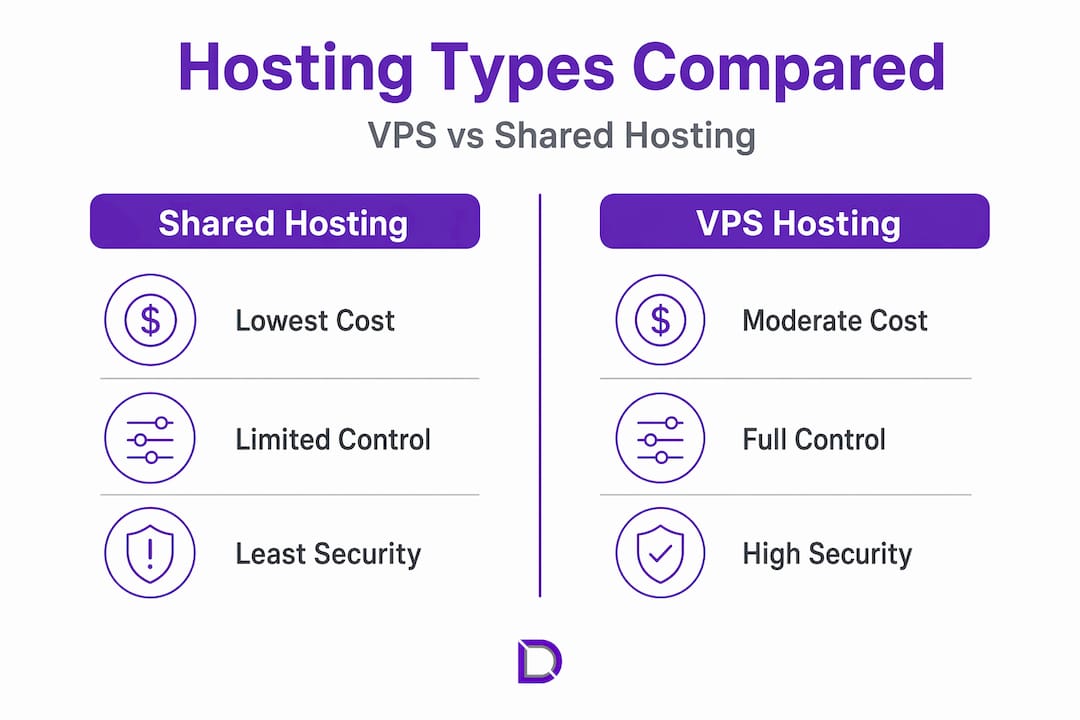
Understanding the difference between VPS and shared hosting is often the moment things click for small business owners. The hosting middle ground that VPS occupies between shared and dedicated hosting is what makes it commercially attractive for growing businesses.
| Feature | Shared hosting | VPS hosting | Dedicated hosting |
|---|---|---|---|
| Cost | Lowest | Moderate | Highest |
| Resource allocation | Shared pool | Reserved per VPS | Fully dedicated |
| Performance consistency | Variable | Consistent | Maximum |
| Security isolation | Minimal | Strong | Complete |
| Root access | No | Yes | Yes |
| Technical management | Managed | Managed or self-managed | Usually self-managed |
| Scalability | Limited | Flexible | Complex |
Shared hosting puts your website on a server alongside potentially hundreds of others, all drawing from the same resource pool. If another site on the server gets a sudden traffic surge, your site slows down. You have no control over the server environment and no ability to install custom software. It works for a basic brochure site, but it can become a problem fast.
Dedicated hosting gives you an entire physical server to yourself. You get maximum control and performance, but you also pay for hardware you may use at only 20 or 30 per cent capacity. For most Australian small businesses, dedicated hosting is overkill and expensive.
VPS hosting solves both problems. You get:
- Consistent, predictable performance because your resources are reserved
- Control over your server environment without managing physical hardware
- Better security than shared hosting through OS-level isolation
- Cost that sits between shared and dedicated, often starting from $20 to $80 per month depending on specifications
- Ability to scale resources up as your business grows
Pro Tip: When comparing web hosting options, do not just look at the monthly price. Factor in the cost of downtime, the value of customer data you are responsible for, and whether the plan lets you grow without migrating to an entirely different hosting type.
Understanding these differences clarifies why VPS could be an excellent fit for your web hosting needs.
How VPS supports security and data privacy for small businesses
Security is where VPS hosting earns its place for businesses that handle customer data, process online transactions, or need to meet basic compliance obligations. The architecture itself is the first line of defence.
Because each VPS runs an isolated OS instance with reserved resource allocations, a security breach on another VPS on the same physical machine does not automatically compromise yours. This is fundamentally different from shared hosting, where a compromised site can sometimes affect neighbouring sites through shared file system paths or server configurations.
Here is what VPS security isolation gives you in practice:
- Independent OS instance: You control what software runs, what ports are open, and what patches get applied
- Root access for security configuration: You can install a firewall, configure intrusion detection, and harden the server to your specific needs
- Reduced “noisy neighbour” risk: Malicious activity from another VPS cannot consume your CPU or RAM in a way that exposes your data
- Custom SSL and encryption settings: You are not constrained by a shared hosting provider’s default configurations
Pro Tip: If you are running a WordPress site and storing customer information, pairing your VPS with a specialised setup is worth considering. Look at WordPress hosting security options that build security layers on top of your VPS environment.
The practical meaning of “private” in VPS is about resource isolation and control, not total hardware exclusivity. For small businesses, that distinction matters enormously, because it delivers meaningful security and privacy improvements at a cost that shared hosting cannot match and dedicated hosting does not justify.
With enhanced security and privacy explained, let us look at how VPS grants you operational control to customise your hosting environment.
Gaining control and flexibility with your own server environment
One of the most underrated VPS hosting advantages is what you can actually do with the server once it is yours to manage. On shared hosting, your provider decides which PHP version runs, which modules are available, and which software is permitted. On a VPS, you make those decisions.
A VPS is commonly used as a configurable environment where you install and manage your own web server, runtime, and security tooling rather than being constrained by shared-hosting templates. For a small business, this translates to real operational benefits:
- Install the exact software stack you need. Whether that is a specific database version, a custom ecommerce engine, or legacy accounting software that only runs on a particular OS, a VPS accommodates it.
- Choose your operating system. Linux distributions (Ubuntu, Debian, CentOS) are popular for cost and security. Windows Server is available for businesses running .NET applications or needing remote desktop access.
- Configure performance settings. You control memory allocation per application, web server worker counts, and caching behaviour, which directly affects how fast your site responds under load.
- Run scheduled tasks and background processes. Shared hosting typically restricts or charges extra for cron jobs and background daemons. On a VPS, these run without limitation.
- Manage your own backups and restore points. You decide how often backups run, what gets backed up, and how long snapshots are retained, rather than relying on a provider’s default schedule.
Pairing this control with organised domain management services means you can manage your hosting environment and your domain infrastructure from a coherent setup rather than juggling disconnected providers.
Now that you understand what flexibility VPS offers, let us examine practical steps and factors to consider when choosing a VPS provider.
Choosing and using a VPS for your small business
Not all VPS providers are built alike. The marketing language around VPS can be misleading, with some providers offering “VPS” plans that are actually containerised shared environments with far less isolation than a true hypervisor-based VPS. Knowing what to ask saves you from paying VPS prices for shared-hosting-level isolation.
As IBM notes, trusted VPS providers should be able to explain their isolation technology and privacy policies clearly. If a provider cannot explain how their hypervisor works or whether your resources are truly reserved, that is a red flag.
| Consideration | What to look for |
|---|---|
| Resource allocation | Guaranteed CPU and RAM, not “burstable” shared limits |
| Isolation technology | Hypervisor-based (KVM, VMware) rather than container-only |
| Managed vs unmanaged | Managed VPS includes support; unmanaged requires technical skill |
| Scalability | Can you upgrade RAM and CPU without migrating? |
| Support quality | Local or Australian-based support with reasonable response times |
| Data location | Are servers physically located in Australia for data sovereignty? |
Key factors to evaluate before signing up:
- Managed VPS options are worth the extra cost if you do not have in-house technical expertise. The provider handles OS updates, security patches, and monitoring.
- Data centre location matters for Australian businesses. Hosting in Australia reduces latency for local visitors and keeps data subject to Australian privacy law.
- Trial periods or money-back guarantees let you test actual performance before committing.
- Support responsiveness should be tested before you need it urgently, not during an outage.
Pro Tip: Start with a smaller VPS plan and scale up. Most reputable providers let you increase RAM and CPU allocations without rebuilding your environment. Overcommitting to a large plan upfront ties up budget you may not need for six to twelve months. Reviewing your web hosting needs every six months keeps costs aligned with actual usage.
With these considerations in mind, let us end with a unique perspective on how VPS fits business priorities beyond just technology specs.
Rethinking VPS: beyond technology to business advantage
Here is what most VPS comparisons miss entirely. The conversation almost always centres on technical specs: RAM, CPU cores, SSD storage. But for Australian small business owners, the real value of VPS hosting is not the gigabytes. It is control over your digital operating environment at a time when that control is increasingly linked to customer trust and regulatory accountability.
The resource isolation and control that defines a VPS maps directly onto what small businesses actually need in 2026: the ability to configure their own security posture, meet data handling obligations under the Australian Privacy Act, and respond quickly when something goes wrong without waiting on a shared-hosting provider’s support queue.
There is also a resilience argument that rarely gets made. When you run on shared hosting, a problem with another tenant’s site can affect your uptime, your site’s reputation in search engines, and your customers’ experience. That is a business risk, not just a technical inconvenience. VPS removes that dependency.
The counterintuitive insight here is that VPS is not a step up from shared hosting in the way “upgrading your car” is. It is a different category of relationship with your hosting environment. You move from being a passenger to being the driver. That shift requires some responsibility, but it also means you are no longer at the mercy of decisions made for someone else’s site.
For most small business web hosting needs, the sweet spot is a managed VPS plan. You get the isolation, control, and privacy improvements of a true VPS without needing to manage every technical detail yourself. The provider handles the infrastructure layer; you focus on your business.
Get the best VPS hosting for your business with Distribute Group
If this guide has clarified your thinking about VPS hosting, the next practical step is finding a provider that actually delivers on the promise.
Distribute Group offers VPS and web hosting plans designed specifically for Australian small businesses, with scalable resource allocations, genuine hypervisor-based isolation, and local support that understands the compliance and performance expectations of businesses operating in Australia. Whether you need root access for a custom application or a fully managed environment where someone else handles the technical details, there is a plan that fits. Pair your hosting with integrated domain management services and domain registration to keep your entire online presence organised under one roof, with one team you can actually call.
Frequently asked questions
Is a virtual private server totally isolated like a dedicated server?
No. A VPS shares physical hardware with other VPS instances, but hypervisor technology isolates each VPS with its own reserved OS and resources, giving you a meaningful level of separation without the cost of a dedicated machine.
Can I install my own software on a VPS?
Yes. VPS provides root access so you can install your own stack, including web servers, databases, and custom applications, rather than being limited to what a shared hosting provider permits.
Is VPS hosting more secure than shared hosting?
Generally yes. Because each VPS runs an isolated OS instance with reserved CPU and RAM, security vulnerabilities on a neighbouring VPS are far less likely to affect yours compared to shared hosting environments.
How do I choose the right VPS plan for my small business?
Start by assessing your traffic, storage needs, and whether you have in-house technical expertise. Always ask providers about their isolation technology and policies to confirm resources are genuinely reserved, then choose a scalable plan with support that matches your capability.
Leave a Reply