




IP reputation hosting is the practice of monitoring and managing the trustworthiness score of IP addresses assigned to your hosting environment to protect email deliverability, website security, and online service reliability. Every server your business runs on carries an IP address, and that address has a reputation score that filters, firewalls, and inbox providers use to decide whether your traffic is welcome. Good IP reputation directly correlates to higher email inbox placement and website accessibility, which means a damaged score can disrupt marketing campaigns and reduce your visibility overnight. Tools like Google Postmaster Tools, AbuseIPDB, and Microsoft SNDS are the standard instruments for tracking this score. Understanding how IP reputation works is not optional for webmasters and digital marketers. It is a core part of keeping your online presence functional and trusted.
What is IP reputation hosting and how does it work?
IP reputation hosting refers to the combined practice of selecting, configuring, and actively managing hosting infrastructure with attention to the trustworthiness score of every IP address in use. The term “IP reputation” is the recognised industry standard. It describes a numerical score assigned to an IP address based on its historical sending behaviour, abuse reports, and association with spam or malicious activity.
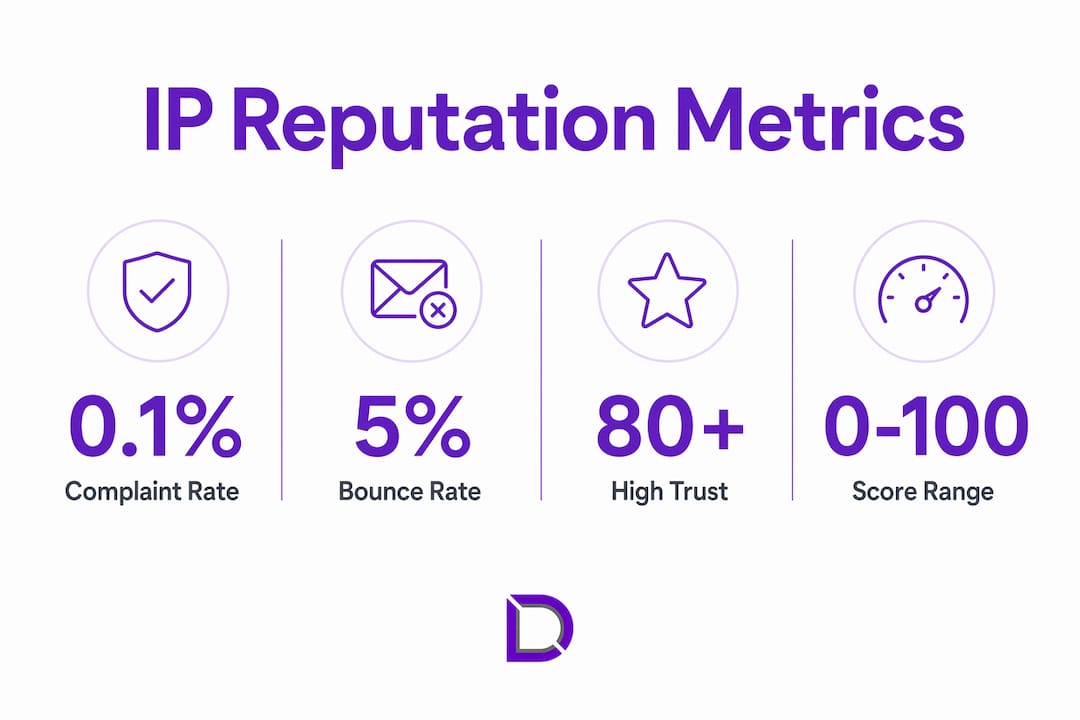
IP reputation scores range from 0 to 100, with scores in the 80–100 band indicating high trustworthiness and reliable inbox placement. Scores in the 25–74 range are treated as suspicious by most mail servers and security filters. Scores below 25 are frequently associated with blacklisting or outright blocking. That spread matters because a single score can determine whether your email campaign lands in the inbox or the spam folder.

The score is not static. It shifts based on key indicators including spam complaint rates, bounce rates, email volume consistency, and blacklist status. Rapid volume spikes or malware activity push scores down quickly. Consistent, clean sending behaviour builds them back up over time.
How is IP reputation scored and monitored?
Reputation scoring systems pull data from multiple sources simultaneously. Google Postmaster Tools tracks domain and IP reputation for Gmail traffic. Microsoft SNDS (Smart Network Data Services) provides complaint and trap hit data for Outlook and Hotmail recipients. AbuseIPDB aggregates community reports of abusive behaviour tied to specific IP addresses.
Each platform uses slightly different thresholds, but the operational benchmarks are consistent across the industry:
- Complaint rate: Keep below 0.1% of sent volume. Above this threshold, inbox providers begin filtering aggressively.
- Bounce rate: Keep below 5%. High bounce rates signal poor list quality, which damages reputation fast.
- Volume consistency: Sudden spikes in sending volume trigger automated suspicion, even from clean IPs.
- Blacklist status: Check against major lists including Spamhaus, Barracuda, and SURBL regularly.
Automated monitoring via APIs from Google Postmaster Tools and Microsoft SNDS is essential once you manage more than 5–10 IP addresses. Manual checks at that scale are simply not practical. Automated alerts flag threshold breaches the moment they occur, giving you time to act before damage compounds.
Pro Tip: Set up automated alerts for complaint rates above 0.08% rather than waiting for the 0.1% threshold. That buffer gives you time to investigate and correct before inbox providers take action.
| Metric | Safe Threshold | Warning Level |
|---|---|---|
| Complaint rate | Below 0.1% | 0.1% and above |
| Bounce rate | Below 5% | 5% and above |
| Volume spike | Gradual ramp only | Sudden large increase |
| Blacklist status | Not listed | Listed on any major blacklist |
Provider reputation vs. individual IP reputation: what is the difference?
These two concepts are related but distinct, and confusing them is one of the most common mistakes webmasters make. Your hosting provider carries its own reputation based on how it handles abuse reports, enforces security policies, and manages its IP ranges. Your individual IP address carries a separate score based on the specific traffic and behaviour originating from that address.
Hosting provider reputation affects how security filters treat your traffic regardless of how clean your individual IP is. A provider known for lax abuse handling will see its entire IP range treated with greater suspicion by spam filters and threat intelligence platforms. Providers with abuse response times of 4–24 hours are considered acceptable by most security standards. Providers that ignore reports for days or weeks drag every client on their network down with them.
The shared IP problem compounds this further. Shared IP reputation means one sender’s poor behaviour can negatively affect every other domain on the same address. If a neighbouring account on your shared hosting plan sends spam, your email deliverability suffers too. Dedicated IPs give you precise control over your own score, which is why they are the preferred choice at higher sending volumes.
There is also the recycled IP problem. Hosting providers recycle IPs previously used by spammers or malware distributors, meaning a new server can arrive with a damaged reputation before you send a single email. Always check the history of any newly provisioned IP using tools like MXToolbox or AbuseIPDB before going live.
| Factor | Hosting Provider Reputation | Individual IP Reputation |
|---|---|---|
| Scope | Entire provider network | Single IP address |
| Influenced by | Abuse handling, security policies | Sending behaviour, complaint rates |
| Your control | Limited, choose provider carefully | High, manage directly |
| Risk | Inherited from provider’s other clients | Inherited from previous IP users |
| Monitoring tool | Threat intelligence platforms | Google Postmaster Tools, AbuseIPDB |
IP reputation and domain reputation must be managed independently. A clean IP cannot rescue a domain flagged for phishing. A trusted domain cannot fix a blacklisted IP. Both signals matter, and both require active attention.
How do you manage IP reputation in a hosting environment?
Effective IP reputation management is a routine, not a one-time task. The following practices form the operational foundation for any webmaster or digital marketer running email campaigns or managing multiple hosted domains.
-
Monitor daily using dedicated tools. Check Google Postmaster Tools, Microsoft SNDS, and AbuseIPDB every day. Set up API-based alerts so you are notified immediately when complaint or bounce thresholds are breached.
-
Practise list hygiene before every campaign. Remove invalid addresses, unsubscribes, and inactive contacts before sending. A clean list is the single most effective way to keep bounce and complaint rates low.
-
Warm up new IPs gradually. Start with low volumes to your most engaged recipients. Increase volume by no more than double every few days. Rushing this process is the fastest way to damage a fresh IP.
-
Avoid rapid volume spikes. Inbox providers treat sudden large increases in sending volume as suspicious behaviour, even from IPs with strong existing scores. Consistency is rewarded.
-
Audit your hosting provider’s abuse policies. Review how quickly your provider responds to abuse reports. A well-managed hosting provider with clear security policies protects your IP range from the behaviour of other clients on the network.
-
Implement SPF, DKIM, and DMARC. These technical controls are necessary but not sufficient. SPF, DKIM, and DMARC alone do not guarantee good IP reputation. Ongoing behaviour and list quality are the decisive factors.
Pro Tip: For agencies or resellers managing multiple client IPs, centralised monitoring tools that aggregate data across all addresses save hours each week and catch problems before clients notice them.
Enterprise-scale IP pool management requires automated alerts for bounce rates above 5% and complaint rates above 0.1%. At 20 or more IPs, manual monitoring is not a viable strategy.
How do you recover from a damaged IP reputation?
Recovery from a damaged IP reputation is possible, but it requires patience and discipline. The timeline depends on how severe the damage is.
- Delisting from blacklists typically takes 24–72 hours after submitting a removal request to services like Spamhaus or Barracuda. This is the fastest part of the process.
- Rebuilding reputation scores with inbox providers takes considerably longer. Full recovery generally requires 4–8 weeks of disciplined sending. Severe cases can take 2–3 months.
- Progress indicators to watch include rising inbox placement rates in Google Postmaster Tools, declining complaint rates, and removal from major blacklists.
The recovery process follows a clear sequence. First, diagnose the root cause using Google Postmaster Tools and Microsoft SNDS. Identify whether the problem is complaint rates, bounce rates, or a specific blacklist. Second, fix the underlying issue before sending anything. Third, begin a gradual warm-up with low volumes to your most engaged subscribers only. Fourth, monitor daily and adjust volume based on what the data shows.
The most common mistake in recovery is switching to a new IP without fixing root causes. A fresh IP inherits none of your old reputation, but it also offers no protection against the same bad habits. Poor list hygiene and high complaint rates will destroy a new IP’s reputation within weeks. The problem follows the sender, not the address.
Recovery is not a sprint. Sending consistently to engaged recipients at low volumes signals to inbox providers that your behaviour has changed. That signal takes time to register and compound into a meaningfully improved score.
Key takeaways
IP reputation hosting is a long-term operational discipline that directly determines whether your emails reach inboxes, your website stays accessible, and your hosting investment delivers real business value.
| Point | Details |
|---|---|
| Scores determine deliverability | IP scores from 0–100 decide inbox placement; below 25 risks blacklisting. |
| Provider choice affects your score | Hosting providers with poor abuse handling drag down every client on their network. |
| Shared IPs carry shared risk | One bad sender on a shared IP can damage your deliverability without any action on your part. |
| Recovery takes weeks, not days | Rebuilding a damaged IP reputation requires 4–8 weeks of disciplined, low-volume sending. |
| Automation is non-negotiable at scale | Managing more than 10 IPs manually is not practical; API-based monitoring is the standard. |
Why IP reputation is a strategic asset, not a technical checkbox
I have watched webmasters treat IP reputation as something to fix once and forget. That approach fails every time, and the consequences are always worse than expected.
The pattern I see most often is this: a business runs a large email campaign, complaint rates spike, and the IP lands on a blacklist. The instinct is to grab a new IP and start again. That instinct is wrong. Switching IPs without fixing the underlying problem resets the clock but not the behaviour. Within weeks, the new address is in the same position as the old one.
What actually works is treating IP reputation the way you treat a credit score. You build it slowly through consistent, responsible behaviour. You protect it by monitoring it regularly. And when it drops, you fix the cause before you worry about the score.
The hosting provider you choose matters more than most people realise. I have seen businesses with excellent sending practices get caught by their provider’s poor abuse handling. Choosing a reputable hosting provider with fast abuse response times is as important as managing your own sending behaviour.
Automation is the other piece most teams underinvest in. Manual monitoring works when you have one or two IPs. Beyond that, you need API integrations and automated alerts. The teams that handle IP reputation well are the ones that get notified of a problem within minutes, not days.
My honest recommendation: build your monitoring routine before you need it. Set your alert thresholds conservatively. And when recovery is necessary, commit to the process fully. Patience during the warm-up phase is not weakness. It is the only thing that actually works.
— James
How Com supports your hosting and domain health
Managing IP reputation starts with choosing the right hosting foundation. Com provides Australian businesses with domain and hosting solutions built around reliability, security, and local support you can actually reach. Whether you are setting up a new hosting environment or reviewing an existing one, getting the infrastructure right from the start protects your IP reputation before problems arise.

Com’s domain management services give you clear visibility over your online assets, while the team’s hands-on approach means you are never left troubleshooting alone. For webmasters and digital marketers who want hosting that supports long-term reputation health, explore what professional hosting includes and how it maps to your business goals. Getting the right setup now saves significant recovery time later.
FAQ
What is IP reputation in hosting?
IP reputation in hosting is a trustworthiness score assigned to a server’s IP address based on its sending behaviour, abuse history, and blacklist status. It directly affects email deliverability and website accessibility.
How do i check my IP address reputation?
Use tools like Google Postmaster Tools, Microsoft SNDS, AbuseIPDB, or MXToolbox to check your IP’s current score and blacklist status. Running checks across multiple platforms gives you the most complete picture.
How long does it take to recover a damaged IP reputation?
Delisting from blacklists takes 24–72 hours, but rebuilding your reputation score with inbox providers typically requires 4–8 weeks of disciplined, low-volume sending to engaged recipients.
Does my hosting provider affect my IP reputation?
Yes. Providers with poor abuse handling policies can cause their entire IP range to be treated with greater suspicion by spam filters, regardless of how clean your individual IP is.
What is the difference between a shared IP and a dedicated IP?
A shared IP is used by multiple accounts simultaneously, meaning one sender’s poor behaviour can affect everyone on that address. A dedicated IP is used exclusively by your account, giving you full control over your reputation score.
Leave a Reply