




Domain expiry stops all email services tied to that domain the moment the registration lapses. The failure is not a mail server problem. It is a DNS collapse. When a domain expires, critical DNS records including MX, SPF, DKIM, and DMARC stop resolving, and every email sent to or from that domain fails immediately. For individuals and businesses, understanding how domain expiry affects email is the difference between a quick fix and weeks of lost communication, damaged reputation, and costly recovery fees.
How does domain expiry affect email delivery?
Email downtime from domain expiry is caused by a DNS delegation break, not a fault with your mail server. This distinction matters because it changes how you diagnose and fix the problem.
Every email address on your domain depends on DNS records to function. The MX record tells other mail servers where to deliver incoming messages. SPF, DKIM, and DMARC records authenticate outgoing messages and protect against spam filtering. When your domain expires, the registry suspends DNS resolution entirely. All of these records stop working at once.
The symptoms look like this:
- Incoming emails bounce back to senders with a delivery failure notice
- Outgoing emails are rejected or flagged as unauthenticated
- Email clients like Microsoft Outlook or Google Workspace report connection errors
- Authentication checks by receiving servers fail because SPF and DKIM records cannot be found
The failure is sudden and total. There is no gradual degradation. One moment email works; the next it does not. This is why DNS records failing simultaneously causes such broad and immediate disruption across all email functions.
Pro Tip: If email stops working unexpectedly, check your domain’s DNS status before contacting your email provider. A simple WHOIS lookup or DNS propagation tool will confirm whether the domain is still active.

Understanding your email hosting configuration also helps clarify which records are at risk and how quickly they are affected when a domain lapses.
What are the domain lifecycle stages after expiry?
The consequences of a lapsed domain are not fixed. They change depending on how long the domain has been expired. Domain lifecycle stages determine what recovery options are available and what they will cost.
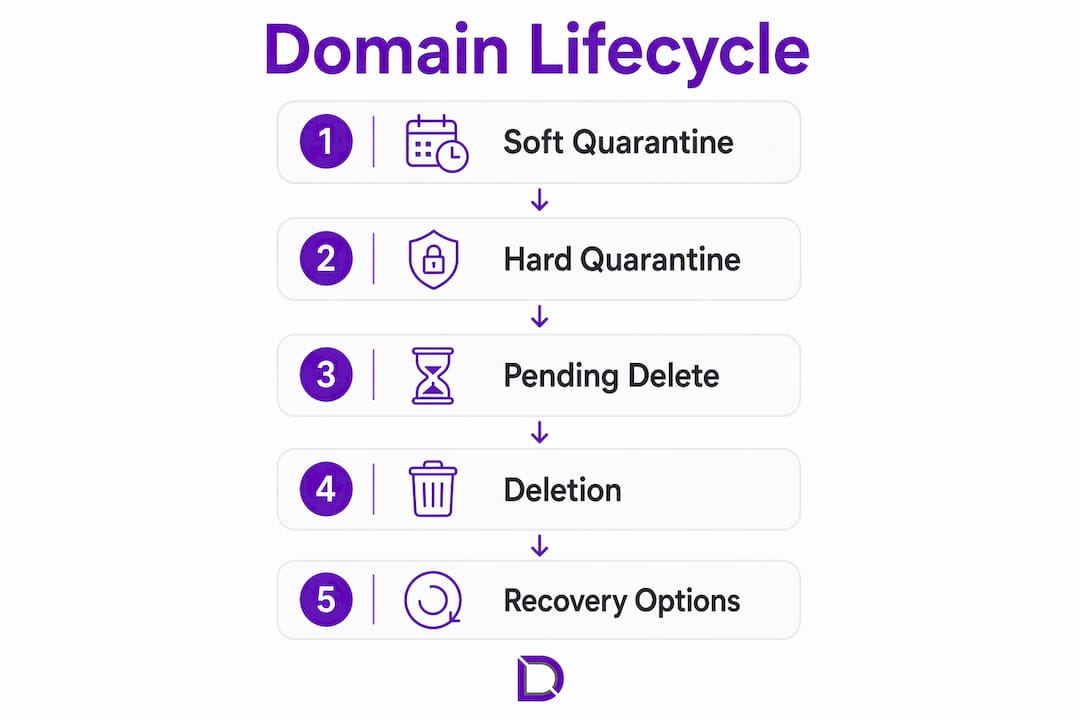
Soft quarantine
Soft quarantine begins immediately after expiry. The domain is suspended, DNS stops resolving, and email ceases. Most registrars allow renewal at the standard registration fee during this stage. Recovery is straightforward and fast. Email service resumes once DNS propagates after renewal, which typically takes a few hours.
Hard quarantine
If the domain is not renewed during soft quarantine, it moves into hard quarantine. This stage adds a redemption fee on top of the standard renewal cost. The fee varies by registry and registrar but is often significantly higher than the original registration price. The window for recovery is limited.
PendingDelete
After hard quarantine, the domain enters pendingDelete. Restoration is not possible once this stage begins. The domain is queued for release back to the public. At this point, all email history tied to that domain is permanently inaccessible through the original registration.
| Stage | Email status | Recovery option | Relative cost |
|---|---|---|---|
| Soft quarantine | Suspended | Renew at standard fee | Low |
| Hard quarantine | Suspended | Renew plus redemption fee | High |
| PendingDelete | Permanently lost | None | Not applicable |
| Post-release | Available to anyone | Re-register if available | Standard fee |
The difference between gTLDs (such as .com and .net) and ccTLDs (such as .com.au and .au) matters here. ccTLD registries set their own quarantine timelines and redemption rules, which can differ significantly from gTLD policies. Australian domain holders should check the specific rules that apply to their TLD.
Pro Tip: Act during soft quarantine. Every day of delay increases the risk of moving into hard quarantine, where recovery fees escalate sharply. Treat a lapsed domain as an urgent incident, not a routine admin task.
Why do registrant contact details affect email continuity?
Outdated registrant contact information is one of the most common causes of missed renewal notices and, by extension, email loss due to domain expiry. The problem is preventable, but it requires deliberate action.
ICANN’s Whois Data Reminder Policy (WDRP) requires registrars to remind owners to verify and update their contact details at least once per year. The Expired Registration Recovery Policy (ERRP) requires registrars to send renewal notices at specific intervals before expiry, typically one month and one week before the expiration date. Both policies depend entirely on the registrant email address being current and monitored.
The practical risk is straightforward. A business that registered its domain five years ago using a staff member’s email address may never receive renewal notices if that person has left. A sole trader who changed internet service providers and forgot to update their registrant email faces the same gap. Outdated contact emails mean ERRP notifications go unread, and the domain lapses without warning.
Best practices to prevent this include:
- Verify your registrant email address at least once per year, ideally when you receive the WDRP reminder
- Set up auto-renewal with a reliable payment method that does not expire before your domain does
- Use a business email address that is not hosted on the same domain being renewed, so you can still receive alerts if the domain lapses
- Add a secondary contact or admin email to your registrar account for redundancy
- Use centralised domain monitoring tools that send alerts via multiple channels, not just email
Relying on a single notification channel is a known risk. If your renewal reminder goes to the same domain that is about to expire, and that domain’s email stops working first, you will never see the alert.
How can you prevent and recover from domain expiration email issues?
Prevention is the most cost-effective strategy for maintaining email continuity. A multi-layered renewal system that combines auto-renewal, backup payment methods, verified contact details, and centralised monitoring is the standard recommendation for businesses that cannot afford email downtime.
Follow these steps to protect your email from domain expiration issues:
- Enable auto-renewal immediately. Log into your registrar account and confirm auto-renewal is active for every domain tied to an active email address. Do not assume it is on by default.
- Add a backup payment method. Expired credit cards are a leading cause of failed auto-renewal charges. Keep a secondary card or direct debit on file.
- Use a registrant email outside the domain. Register with a Gmail, Outlook, or other external address so renewal notices reach you even if the domain lapses.
- Set calendar reminders independently. Add a recurring annual reminder 60 days before your domain expiry date. Do not rely solely on registrar notifications.
- Check domain status immediately if email fails. Run a WHOIS lookup on your domain before contacting your email provider. Confirm the expiry date and current lifecycle stage.
- Act within soft quarantine. If your domain has lapsed, renew it immediately at the standard fee before it moves to hard quarantine. Every hour matters.
- Evaluate redemption fees honestly. If you are in hard quarantine, weigh the redemption cost against the value of your email history and business continuity. For most businesses, paying the redemption fee is far cheaper than rebuilding from scratch.
Understanding how a domain registrar works gives you a clearer picture of the renewal process and the options available at each stage.
Pro Tip: Domain expiry tracking tools and registrar dashboards often show expiry dates across multiple domains in one view. If you manage more than one domain, centralised tracking is not optional. A single missed renewal can take down email for an entire business.
Key takeaways
Domain expiry stops email service immediately by disabling DNS records, and recovery becomes harder and more expensive with every stage of the domain lifecycle.
| Point | Details |
|---|---|
| DNS failure causes email loss | MX, SPF, DKIM, and DMARC records all stop resolving when a domain expires, cutting off email instantly. |
| Act during soft quarantine | Renewing in soft quarantine costs only the standard fee; waiting for hard quarantine adds significant redemption charges. |
| PendingDelete is permanent | Once a domain enters pendingDelete, email and domain history cannot be recovered through the original registration. |
| Outdated contact info is a real risk | ERRP renewal notices only work if your registrant email is current, monitored, and not hosted on the expiring domain. |
| Layered prevention is the standard | Auto-renewal, backup payment, external registrant email, and centralised monitoring together reduce email outage risk significantly. |
The DNS angle most businesses miss
Most of the domain expiry incidents I see come down to one misdiagnosis. A business notices email has stopped, contacts their email provider, spends hours troubleshooting mail server settings, and only discovers the real cause days later. The domain expired. The entire investigation was pointed at the wrong problem.
Domain expiry is a DNS responsibility event, not a mail server event. The moment you treat it that way, your incident response becomes faster and more accurate. Check domain status first. Always.
The other pattern I see regularly is businesses that have auto-renewal enabled but a payment method that quietly expired six months earlier. The renewal attempt fails silently. No one notices until email stops. A backup payment method on file would have prevented the entire incident.
The fastest recoveries I have observed share one thing: the business acted within hours of expiry, not days. Soft quarantine is a genuine safety net, but it is not a wide one. Businesses that caught the lapse within the same day renewed at standard cost and had email restored within a few hours. Those that waited days faced redemption fees, and those that waited weeks sometimes lost the domain entirely.
Treat domain renewal the same way you treat business insurance. You do not wait until something goes wrong to check whether it is current.
— James
Domain management that keeps your email running
Email disruption from a lapsed domain is one of the most avoidable problems in digital business management. Com offers domain management services built specifically for Australian individuals and businesses who need reliable expiry monitoring, renewal support, and local expert guidance.
Com’s domain management service covers the full lifecycle of your domain, from registration through to renewal alerts and recovery support. If you manage multiple domains or simply want the confidence that your email will not go dark without warning, Com provides the monitoring and hands-on support to keep things running. You can also browse the full range of domain options to find the right fit for your business.
FAQ
What happens to email when a domain expires?
Email stops working immediately when a domain expires. DNS records including MX, SPF, DKIM, and DMARC cease resolving, so incoming messages bounce and outgoing messages fail authentication.
Can I recover my email after a domain expires?
Yes, if you act during soft quarantine by renewing at the standard fee. Recovery becomes more expensive in hard quarantine and is impossible once the domain enters pendingDelete.
How long does soft quarantine last?
Soft quarantine timelines vary by TLD and registrar. gTLDs typically offer a grace period of a few days to several weeks, while ccTLD rules differ by registry. Check with your registrar for the exact window.
Why did I not receive a renewal notice before my domain expired?
ICANN’s ERRP policy requires registrars to send renewal notices, but those notices only reach you if your registrant email address is current. An outdated or inactive registrant email is the most common reason notices go unread.
Does renewing a domain restore email immediately?
Renewal triggers DNS restoration, but email does not return instantly. DNS propagation typically takes a few hours, after which MX and authentication records become active again and email resumes.
Leave a Reply