


Two-factor authentication hosting is defined as a security method that requires two distinct forms of verification before granting access to a hosting account. The industry standard term is two-factor authentication, commonly abbreviated as 2FA, and it sits at the core of what security professionals call NIST Authentication Assurance Level 2 (AAL2). For individuals and small business owners, understanding what is two-factor authentication hosting means understanding the single most effective baseline control available to protect your website, data, and customers from unauthorised access.
What is two-factor authentication hosting and how does it work?
Two-factor authentication hosting works by combining two separate verification factors every time you log in to your hosting account. The first factor is something you know, typically your password. The second is something you have, such as a code generated by an authenticator app or a physical hardware token.

The two factors must come from different categories. This is the critical point most people miss. A password paired with a security question is not true 2FA because both belong to the “something you know” category. True 2FA requires combining factors from two distinct categories, and anything less offers no meaningful additional defence.
The most common second factor in hosting environments is a Time-based One-Time Password, known as a TOTP. Authenticator apps generate these codes, and each code expires after 30 seconds. That short window means a stolen code is useless almost immediately. Platforms like cPanel and Plesk both support TOTP natively, making setup straightforward for most hosting accounts.
SMS codes versus authenticator apps
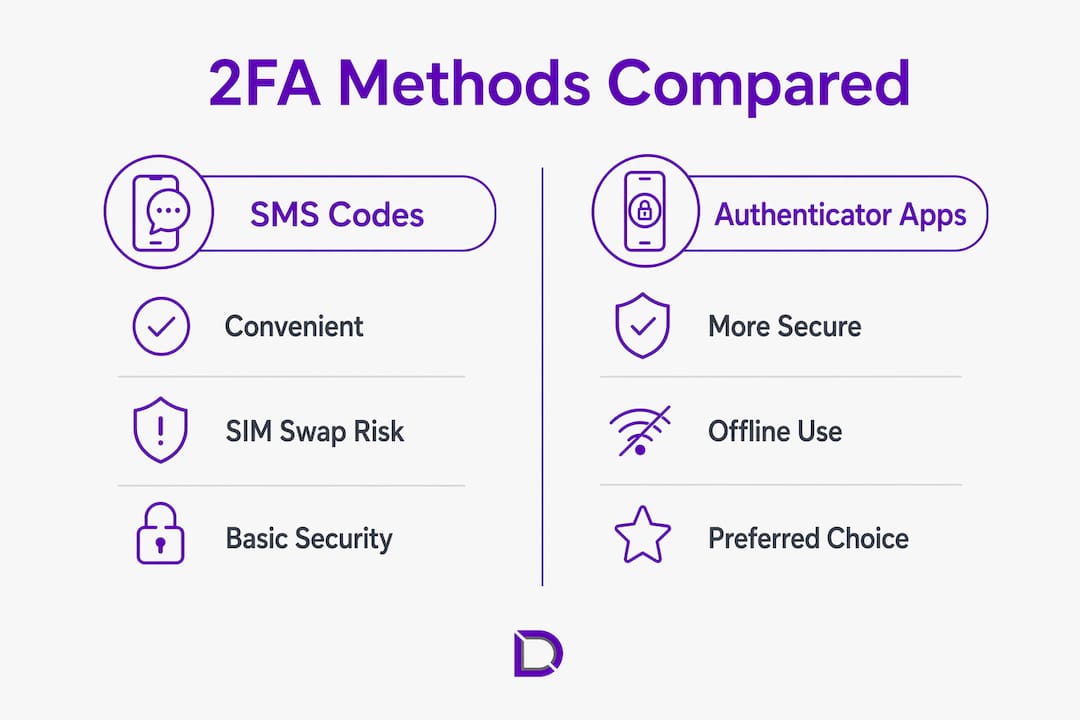
SMS codes feel convenient, but they carry a serious weakness. SMS-based verification is vulnerable to SIM swapping attacks, where a criminal convinces your mobile carrier to transfer your number to their SIM card. Once they control your number, they receive your verification codes. Authenticator apps and hardware tokens do not rely on your phone number, so SIM swapping cannot compromise them.
Pro Tip: Switch from SMS verification to an authenticator app like Google Authenticator or Authy as soon as your hosting provider supports it. The setup takes under five minutes and removes one of the most exploited attack vectors.
Two-step verification versus true 2FA
Two-step verification and two-factor authentication are not the same thing, even though the terms are often used interchangeably. Two-step verification can use two factors from the same category, such as a password followed by a security PIN. True 2FA always combines factors from two different categories. When you are evaluating your hosting account security, confirm that your provider implements genuine two-factor authentication, not just a two-step process.
How to set up two-factor authentication on your hosting account
Setting up 2FA on a hosting account is a process that takes under 10 minutes for most people. The steps below apply to the most widely used hosting control panels, including cPanel, Plesk, and WHM.
- Log in to your hosting control panel. Navigate to the security settings section. In cPanel, this is found under the “Security” menu. In Plesk, look under “My Profile.”
- Enable two-factor authentication. Select the option to activate 2FA. The platform will display a QR code on screen.
- Scan the QR code. Open your authenticator app and use its camera function to scan the QR code. The app will begin generating 30-second TOTP codes linked to your account.
- Enter the verification code. Type the current code from your app into the confirmation field on the hosting platform. This confirms the link between your account and the app.
- Save your backup codes immediately. The platform will generate a set of emergency scratch codes. Save these backup codes in a secure location, such as a password manager or printed and stored offline. Losing your authentication device without these codes will lock you out of your account.
- Test the login. Log out and log back in to confirm 2FA is working correctly before closing the setup screen.
Pro Tip: If your TOTP codes are being rejected despite correct entry, the cause is almost always a time sync issue. Server clock drift causes TOTP failures because the code generated by your app and the code expected by the server are calculated from the current time. Sync your device clock to an internet time server to fix this instantly.
Extending 2FA beyond the control panel
Enabling 2FA on your hosting control panel does not automatically protect every access point. SSH access, which is remote terminal access to your server, requires separate configuration. Securing SSH with 2FA requires configuring PAM (Pluggable Authentication Modules) and SSHD on the server. If you use SSH to manage your server, this step is not optional. Similarly, your CMS admin panel, such as WordPress, requires its own 2FA plugin or setting, separate from your hosting panel configuration.
Common mistakes that undermine two-factor authentication hosting
The most damaging mistakes with 2FA are not technical. They are misunderstandings about what 2FA actually protects and how it works.
- Using two passwords instead of two factor types. Entering a password and then a PIN is not 2FA. Two verification methods from the same category provide no additional security layer. Check that your second factor comes from a different category entirely.
- Relying solely on SMS for verification. SMS codes are better than no second factor, but they are the weakest option available. SIM swapping is a documented and growing attack method. Move to an authenticator app as soon as possible.
- Failing to save backup codes. Losing your phone or authentication device without backup codes means losing access to your hosting account. Recovery processes are complex and can cause significant downtime for your website. Save backup codes the moment they are generated.
- Assuming the control panel covers everything. Enabling 2FA in cPanel or Plesk protects that login only. SSH access and CMS admin panels each need their own 2FA configuration. A partially protected account still has open doors.
- Not checking the cPanel vs Plesk differences. Each platform has slightly different steps for enabling and managing 2FA. Knowing your control panel saves time and avoids configuration errors.
Why two-factor authentication hosting matters for small businesses
Two-factor authentication is the single most effective baseline security control for hosting accounts. Implementing 2FA drastically reduces the risk of account compromise from password theft, phishing attacks, and brute force attempts. For a small business, a compromised hosting account can mean website defacement, data theft, ransomware, and lost customer trust.
Passwords alone fail regularly. Credential stuffing attacks use lists of stolen passwords from unrelated breaches to try logging in to hosting accounts. If your password appears in any previous data breach, an attacker can access your account without any sophisticated technique. 2FA stops this attack entirely because the stolen password alone is not enough.
“Two-factor authentication prevents credential stuffing and lateral ransomware spread, making it the most impactful single security control a small business can implement for its hosting environment.”
The effort required to set up 2FA is genuinely low. NIST Special Publication 800-63B recommends AAL2 for any system handling sensitive data, and hosting accounts almost always qualify. Setup takes under 10 minutes. The protection it provides is ongoing and requires no ongoing maintenance beyond keeping your backup codes safe. For a small business owner managing a website, customer data, or an online shop, that return on time invested is difficult to match with any other security measure.
Managing hosting account permissions alongside 2FA adds another layer of control, particularly if multiple team members access the same hosting environment.
Key takeaways
Two-factor authentication hosting is the most effective, lowest-effort security control available to small business owners managing hosting accounts in 2026.
| Point | Details |
|---|---|
| True 2FA requires two distinct factor types | Combining a password with a security question is not 2FA. Use a password plus an authenticator app. |
| Authenticator apps outperform SMS | TOTP codes expire in 30 seconds and cannot be intercepted via SIM swapping. |
| Backup codes prevent lockout | Save emergency scratch codes immediately during setup to avoid losing account access. |
| SSH needs separate 2FA configuration | Enabling 2FA on cPanel or Plesk does not protect SSH logins without additional server setup. |
| NIST AAL2 endorses 2FA for sensitive data | NIST Special Publication 800-63B recommends two-factor authentication for any account handling sensitive information. |
The setup is quick. The regret of skipping it is not.
After working with small business owners on their hosting security for years, the pattern I see most often is this: people know they should set up 2FA, they put it off because it sounds technical, and then they deal with a compromised account that costs them days of recovery time and real money.
The setup genuinely takes under 10 minutes. I have watched people who had never touched a hosting control panel before complete it on their first try. The QR code scan is the most “technical” step, and a smartphone camera handles it automatically.
My strong recommendation is to use an authenticator app rather than SMS from day one. I have seen SIM swapping happen to real people, and it is a genuinely awful experience to watch someone lose access to their business website because a mobile carrier was deceived. An authenticator app removes that risk entirely.
The one step people consistently skip is saving backup codes. Do not skip it. Store them in a password manager, print them and put them in a drawer, or save them somewhere you will actually find them in an emergency. Losing your phone should be an inconvenience, not a crisis.
Treat 2FA as the foundation of your hosting security, not the ceiling. Combine it with strong unique passwords, regular permission reviews, and keeping your CMS and plugins updated. Each layer compounds the others.
— James
Secure hosting starts with the right support
Protecting your hosting account with two-factor authentication is a strong first step. Getting the full picture of your hosting security, from domain management to access controls, is where professional support makes a real difference.

Com is an Australian-based domain and website solutions provider with local support that understands what small businesses actually need. Whether you are setting up a new hosting environment or reviewing the security of an existing one, Com’s team can help you get it right. Explore Com’s domain management services to see how a properly configured, secure hosting environment is built from the ground up. If you are not sure where your current setup stands, the free business checklist is a practical starting point for identifying gaps before they become problems.
FAQ
What is two-factor authentication hosting?
Two-factor authentication hosting is a security method that requires two separate verification factors, such as a password and a TOTP code from an authenticator app, before granting access to a hosting account. It meets the NIST AAL2 standard for sensitive data access.
Is SMS verification safe enough for hosting accounts?
SMS verification is better than no second factor, but it is vulnerable to SIM swapping attacks. Security professionals recommend using an authenticator app or hardware token instead for stronger protection.
What happens if I lose my authenticator device?
If you saved your backup scratch codes during setup, you can use one to regain access. Without those codes, account recovery is complex and can cause significant website downtime.
Does enabling 2FA on cPanel protect my SSH access?
No. Enabling 2FA on cPanel or Plesk protects only the control panel login. SSH access requires separate PAM and SSHD configuration on the server to enforce two-factor authentication.
How long does it take to set up two-factor authentication on a hosting account?
Setup typically takes under 10 minutes and involves scanning a QR code with an authenticator app and saving backup codes. Most major hosting control panels, including cPanel and Plesk, support this process natively.
Leave a Reply