




Most agencies and small businesses reach a point where clients start asking who handles their hosting. If the answer is “another company,” you lose control of the relationship, the margin, and often the client. White-label hosting for clients solves exactly this problem. It lets you sell hosting services under your own brand, with your logo, your pricing, and your support process, without building or managing servers. This guide walks through everything from picking a provider to onboarding your first client and scaling from there.
Table of Contents
- Key takeaways
- What white-label hosting for clients actually means
- What you need before you launch
- Setting up and launching your white-label service
- Common problems and how to avoid them
- Measuring success and scaling up
- My take on white-label hosting
- Start your white-label hosting journey with Com
- FAQ
Key takeaways
| Point | Details |
|---|---|
| Brand control matters | White-label hosting lets you present hosting as your own service, keeping clients loyal to you. |
| Provider selection is critical | Choose a provider with at least 99.9% uptime and scalable plans before launching to clients. |
| Billing tools save hours | Platforms like WHMCS automate invoicing and account provisioning, reducing manual admin significantly. |
| Branding leaks lose trust | Configure custom nameservers and branded emails from day one to prevent exposing your upstream provider. |
| Margins require planning | Set pricing based on your provider costs, support overhead, and desired profit margin before selling. |
What white-label hosting for clients actually means
There is a lot of loose terminology in this space, so it helps to be precise. White-label hosting is when you purchase hosting infrastructure or reseller capacity from a provider, then rebrand and resell it to your clients under your own business name. Your clients never know who the underlying provider is. They see your logo, your support email, and your billing.
This differs from simply recommending a hosting provider to a client. With private label web hosting, you are the provider in your client’s eyes. You set the prices, you handle first-line support, and you own the relationship.
Reseller hosting is often used interchangeably with white-label hosting, but there is a subtle difference. Reseller hosting refers to the technical arrangement where you buy bulk hosting capacity. White-label hosting refers to the branding layer you apply on top. Most reseller hosting solutions include the tools needed to white-label the service, such as custom nameservers, branded control panels, and client management portals.
Managed hosting is a step further again. With managed hosting for agencies, the provider takes on more of the day-to-day technical operations, like updates, security patching, and backups. You get less hands-on control but fewer operational headaches.
Here are the key benefits that make white-label hosting worth considering for agencies and SMBs:
- Recurring revenue. Hosting creates a predictable monthly income stream that compounds as you add clients.
- Stronger client retention. When you own the hosting relationship, clients have one more reason to stay with you.
- No server management. Agencies can focus on growth while the backend infrastructure complexity sits with the provider.
- Brand authority. Offering hosting under your own name positions you as a full-service digital provider, not just a vendor.
- Scalability. You can start with a handful of client accounts and scale up without changing your setup.
What you need before you launch
Preparation is where most first-time resellers cut corners, and it costs them later. Before you sign up for any white-label server solutions, you need to think through four areas: provider selection, tooling, legal agreements, and pricing.
Choosing a provider
Your provider’s reliability becomes your reliability. Selecting a provider with at least 99.9% uptime is non-negotiable, because every minute of downtime reflects on your brand, not theirs. Look for providers that offer genuine white-label features: custom nameservers, unbranded server environments, and dedicated support channels for resellers.

The cost structure also matters. Raw compute hosting can start around $100 per month, but most agencies are better served by managed reseller plans that bundle cPanel licences, billing software, and support. The trade-off is slightly less control, but far less operational overhead. For Australian small businesses, local hosting providers also offer latency advantages and local compliance alignment that international providers cannot match.
Tooling and billing systems
The two platforms you will encounter most often are cPanel and WHMCS. cPanel is the hosting control panel your clients use to manage files, databases, and email. WHMCS is the billing and client management platform that handles invoices, account provisioning, and support tickets automatically. Some reseller plans include WHMCS licences at no extra cost, which is a meaningful saving given that WHMCS alone can cost $15 to $30 per month.
Pro Tip: Before committing to a provider, test their support responsiveness yourself. Log a non-urgent query and measure how long it takes to get a useful response. This tells you exactly what your clients will experience if something goes wrong.
Legal and pricing considerations
You need a white-label agreement with your provider that explicitly prohibits them from contacting your clients directly or exposing their branding in any communications. Read this carefully. On the client side, your own hosting terms of service should cover acceptable use, backups, support scope, and SLA commitments.
Pricing strategy is straightforward in principle: your retail price must cover your provider cost, your support time, and a margin that makes the service worthwhile. A common starting point is a 2x to 3x markup on provider costs, adjusted based on the level of support you offer.
Setting up and launching your white-label service
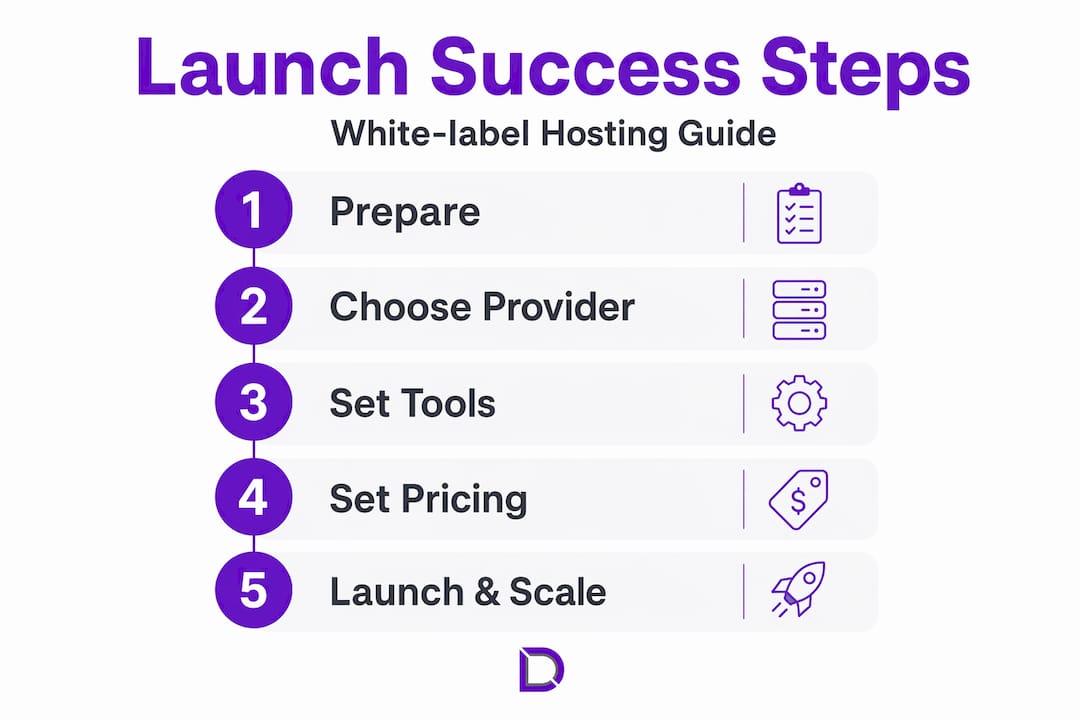
This is where preparation pays off. The actual setup process follows a logical sequence.
- Register your reseller account. Sign up with your chosen provider and select the reseller or white-label plan that fits your expected client volume. Most providers let you upgrade as you grow.
- Configure your custom nameservers. This is the single most important branding step. Custom nameservers (for example, ns1.youragency.com.au and ns2.youragency.com.au) mean your clients never see the provider’s name in DNS records. Your provider’s control panel will walk you through this setup.
- Brand the client control panel. Upload your logo, set your colour scheme, and configure the portal URL to match your domain. This takes less than an hour and has a significant impact on perceived professionalism.
- Set up branded email communications. All automated emails, including account welcome messages, password resets, and invoices, should come from your domain. Configure WHMCS or your billing platform to use your email address and templates before you create any client accounts.
- Create your hosting packages. Define the resource allocations (disk space, bandwidth, email accounts) for each package tier. Think about what a typical client actually needs rather than what sounds impressive in a feature list. Overly generous plans erode your margins; overly tight plans generate support tickets.
- Test everything before going live. Create a test client account, go through the provisioning process, log in as that client, send a test invoice, and raise a support ticket. If anything feels confusing or broken as a test client, fix it before your real clients see it.
- Onboard your first clients. Send a welcome email that explains what they have access to, how to log in, and how to contact support. Keep it simple. Most clients do not want a technical manual; they want to know things are being looked after.
Client-branded hosting services live and die by the onboarding experience. A smooth first impression builds trust that carries through the entire relationship.
Pro Tip: Create a short onboarding document or video walkthrough specific to your hosting portal. Clients who understand their control panel generate far fewer support requests.
Common problems and how to avoid them
Even with good preparation, issues come up. Knowing what to expect makes a significant difference.
Uptime complaints are usually the first test. When a client’s site goes down, they call you, not your provider. Have an internal escalation process ready: check your provider’s status page first, then log a priority ticket with your reseller support channel. Communicate proactively with the affected client, even if you do not yet have a resolution.
Branding leaks happen more often than people expect. A single automated email with the provider’s name in the footer, or a cPanel login page that shows the provider’s logo, can undermine months of brand building. Audit every touchpoint after setup and again after any provider updates.
DNS misconfigurations are the most common technical mistake. Incorrect nameserver propagation or missing DNS records can take sites offline and are time-consuming to diagnose. Always test DNS changes in a staging environment first and use a propagation checker to confirm settings are live before informing clients.
Avoid the temptation to promise managed backups unless you have verified exactly how your provider handles them and built a process to confirm they run successfully. Many resellers assume backups are automated, only to discover gaps at the worst possible moment.
Other frequent pitfalls include billing errors from misconfigured WHMCS products and failing to set clear SLA expectations upfront. Put your SLA in writing, even if it is simple. “We target a response time of four business hours for support requests” is far better than leaving it ambiguous.
Measuring success and scaling up
Once your service is live and stable, shift your attention to the metrics that tell you whether it is actually working.
| Metric | What to track | Why it matters |
|---|---|---|
| Client retention rate | % of clients renewing each billing cycle | Direct measure of satisfaction and service quality |
| Support ticket volume | Tickets per client per month | High volume suggests onboarding or platform issues |
| Uptime percentage | Monthly average across all client accounts | Core reliability indicator for your SLA |
| Gross margin per client | Revenue minus provider and support costs | Tells you if pricing is sustainable as you scale |
| Time to resolve tickets | Average resolution time in hours | Affects client satisfaction and your team’s workload |
Most billing platforms and hosting control panels expose this data in their reporting tools. Review it monthly rather than reactively. When support ticket volume climbs, that is usually a signal to improve documentation or address a recurring technical issue, not just to hire more support staff.
Scaling beyond a handful of clients often means moving to a higher reseller tier or upgrading to dedicated infrastructure to maintain performance. Adding value-added services like managed WordPress hosting, SSL management, or monthly maintenance plans can significantly increase revenue per client without proportionally increasing your workload.
My take on white-label hosting
I have watched a lot of agencies add hosting to their service offering, and the ones that struggle share a common pattern. They rush the setup, under-price the service, and then find themselves locked into a time-consuming support burden that generates almost no real margin.
The agencies that do it well treat hosting as a product, not an afterthought. They invest time upfront in choosing the right provider, building proper client communication templates, and setting expectations clearly. In my experience, the single biggest factor separating profitable hosting resellers from frustrated ones is provider quality. Saving $20 a month on a cheaper provider is not worth it when their support takes 24 hours to respond and their infrastructure has unexplained outages.
I also think a lot of people underestimate how much the billing and automation side matters. When WHMCS is configured properly, it runs itself. Renewals go out automatically, accounts provision on payment, and you spend almost no time on admin. When it is configured badly, or not at all, you are manually chasing invoices and creating accounts by hand. That is not a business; that is a second job.
My honest recommendation: start with hosting for digital agencies that is designed with resellers in mind, test it thoroughly yourself, and launch with two or three clients before opening it up broadly. The learning curve is real, but it compresses quickly with experience.
— James
Start your white-label hosting journey with Com
Com is an Australian-based provider built specifically for businesses and agencies that want to grow online without the complexity of managing infrastructure themselves. Whether you are setting up your first reseller account or looking to migrate an existing client base, Com’s web hosting plans are designed with scalability, local support, and agency workflows in mind.
Com also handles domain management for agencies managing multiple client projects, making it straightforward to keep DNS, renewals, and hosting all in one place. With personalised support from a local team that understands the Australian market, you get the kind of backup that actually matters when a client’s site goes down on a Friday afternoon. Reach out to the Com team to talk through your hosting setup and find the right plan for your business.
FAQ
What is white-label hosting for clients?
White-label hosting lets you resell hosting services under your own brand, so clients see your business name rather than the underlying provider. It combines reseller hosting infrastructure with custom branding tools like nameservers, control panels, and billing systems.
How much does it cost to start reselling hosting?
Costs vary by provider and plan, but reseller plans start around $100 per month for entry-level options. Many plans include WHMCS and cPanel licences, which reduces your additional tooling costs significantly.
Do clients know who the actual hosting provider is?
Not if you set things up correctly. Configuring custom nameservers, branded control panels, and white-label email templates means your provider’s name never appears in any client-facing communication.
What billing software should I use for white-label hosting?
WHMCS is the industry standard for reseller billing automation, handling invoicing, account provisioning, and support tickets. Some providers include a WHMCS licence in their reseller plan, which is worth prioritising when comparing options.
How many clients do I need to make white-label hosting profitable?
There is no universal number, but most resellers find that covering their provider costs and support overhead typically requires between five and ten active clients, depending on the plan tier and the margin they have built into their pricing.
Leave a Reply