




Private domain registration is the process of masking your personal contact information in public WHOIS records, replacing it with proxy details supplied by your registrar. Every domain registered worldwide is linked to a WHOIS record containing the registrant’s name, email, phone number, and address. Without privacy protection, that data is freely searchable by anyone. For Australian individuals and small business owners, this exposure creates real risks: spam, unsolicited sales calls, and identity harvesting. Registrars like Namecheap and Cloudflare offer domain privacy services that replace your real details with generic proxy contacts, and Com provides the same protection with local Australian support.
What do you need before you set up private domain registration?
Three things determine whether your privacy setup will work: your chosen domain extension, your registrar, and how you classify yourself at registration.
Privacy protection availability depends on the TLD and the registry’s policies. Common extensions like .com, .net, and .org support WHOIS privacy at most registrars. Australian extensions like .com.au and .net.au have different rules governed by auDA, the .au Domain Administration. As of 2026, auDA requires registrants to provide accurate contact details, and privacy proxying on .au domains is more restricted than on generic TLDs. If you need a .au domain with maximum privacy, you will need to confirm your registrar’s specific policy before purchasing.

Your registrant category matters more than most guides acknowledge. Registering as an individual automatically provides free WHOIS privacy on .CA domains through CIRA, because individual contact details are protected by default. The same logic applies across many registries: individual registrants receive stronger default privacy than businesses. If you register a domain under a business name when you are actually an individual, you may lose automatic privacy protections that would otherwise apply.
Registrar comparison for Australian owners
| Registrar | Privacy on .com | Privacy on .com.au | Cost |
|---|---|---|---|
| Namecheap | Free on eligible TLDs | Not offered | $0 extra |
| Cloudflare | Free | Not offered | $0 extra |
| Com (Distribute Group) | Included | Subject to auDA rules | Locally supported |
| VentraIP | Available | Subject to auDA rules | Check at registration |
Pro Tip: Before you purchase, search the registrar’s help centre for your exact TLD and the phrase “WHOIS privacy” to confirm support. Do not assume privacy is available just because the registrar offers it on other extensions.
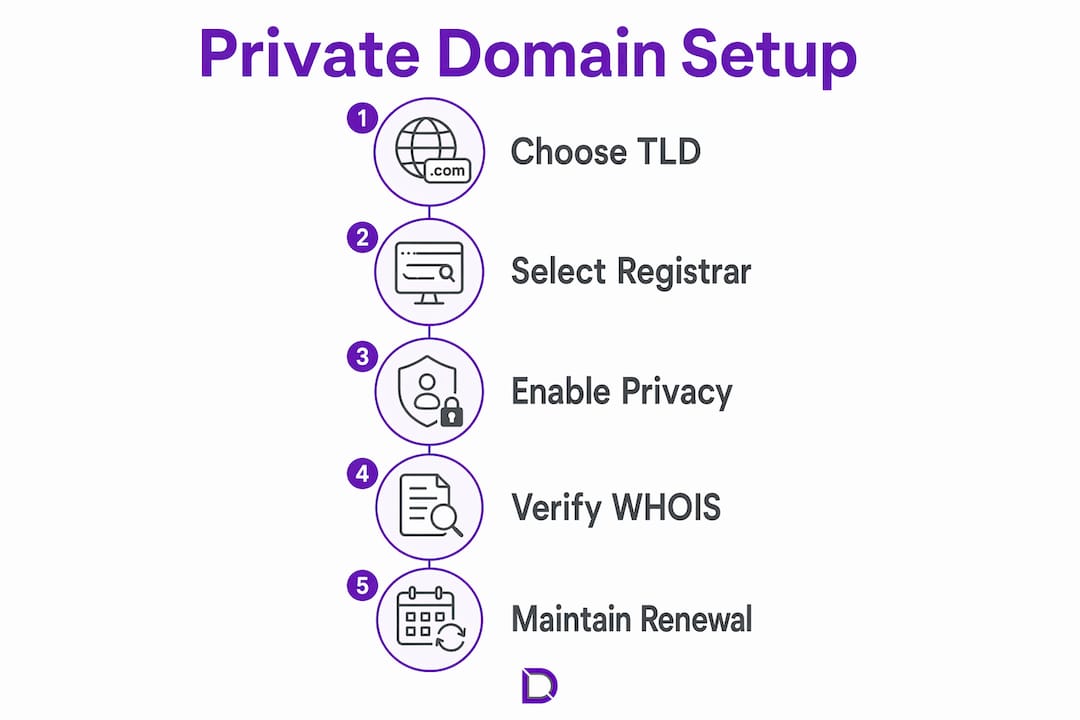
How to set up private domain registration step by step
The process takes under 15 minutes if you have your details ready. Follow these steps to register your domain and activate privacy protection correctly.
-
Search for your domain name. Go to your chosen registrar, such as Namecheap, Cloudflare, or Com, and search for the domain name you want. Check availability across multiple extensions if your preferred .com is taken.
-
Choose the right registrant category. When prompted, select “individual” if you are a person registering for personal use or as a sole trader. Select “organisation” only if you are registering on behalf of a company. Correct classification at registration ensures automatic privacy benefits and avoids compliance issues later.
-
Add domain privacy protection. Most registrars present this as a tick box or add-on during checkout. Namecheap includes free Domain Privacy on eligible TLDs, so the option appears automatically. Cloudflare includes it at no extra cost for all supported extensions. If your registrar charges a fee, it is typically a small annual amount worth paying.
-
Enter your real contact details accurately. This sounds counterintuitive, but your registrar needs your real information on file. Domain privacy protection replaces your real details in the public WHOIS record with proxy contacts. Your registrar holds the real data internally and uses it to contact you about renewals, disputes, or legal matters.
-
Complete your purchase and verify your email. ICANN requires email verification for new domain registrations. Check your inbox and click the verification link within 15 days. Failure to verify can result in your domain being suspended.
-
Confirm privacy is active. After registration, search your domain on a public WHOIS lookup tool such as whois.domaintools.com. The registrant name and contact fields should show your registrar’s proxy details, not your personal information. If your real details appear, log into your registrar’s control panel and enable privacy protection manually under domain settings.
-
Set up auto-renewal. Privacy protection and domain registration are both annual services. Enable auto-renewal so neither lapses. A lapsed domain can be snapped up by someone else, and a lapsed privacy setting re-exposes your contact details publicly.
Pro Tip: Screenshot your WHOIS lookup result after setup. If your registrar ever updates its privacy policies or your privacy lapses during renewal, you have a baseline to compare against.
Common mistakes when registering a private domain
Most privacy failures come from decisions made in the first five minutes of registration, not from technical errors.
-
Selecting the wrong registrant category. Registering as a business when you are an individual can remove automatic privacy protections. Registrar support can modify registrant details post-registration if you selected the wrong category, but it requires contacting support and may take several days.
-
Assuming privacy is included without checking. Not all TLDs support WHOIS privacy. Some country-code extensions and specialty TLDs explicitly prohibit privacy proxying under their registry rules. Always verify before you buy.
-
Confusing domain ownership with privacy. Your name appears in two places: the WHOIS record and the domain’s ownership record held by the registrar. Privacy protection masks the WHOIS record only. Your registrar still knows who you are, and that information can be disclosed under legal demand.
-
Not knowing how to be contacted when your domain is private. If someone needs to reach you about your domain, they are not locked out entirely. CIRA provides a Message Delivery Form that lets people send messages to private registrants without revealing contact details. Most registrars offer a similar proxy contact mechanism.
“Private registration does not mean total anonymity. Registrars retain your real data and may provide it under legal demand.” — ServPrivacy
This is the most misunderstood aspect of domain privacy. It protects you from data scrapers, spammers, and casual lookups. It does not protect you from courts, law enforcement, or legitimate legal processes.
How does domain privacy fit into your broader security strategy?
WHOIS privacy is one layer of a broader privacy picture, not a complete solution on its own. Small business owners in Australia face exposure through multiple channels simultaneously.
Business registration records held by ASIC are publicly searchable and often include a registered office address. If you use your home address as your registered business address, that information is publicly available regardless of your domain privacy settings. A registered agent service provides a professional business address for ASIC records, keeping your home address out of public view. This complements domain privacy rather than replacing it.
Other layers worth considering alongside domain privacy:
- Email privacy. Use a business email address tied to your domain rather than a personal Gmail or Hotmail account. This limits the personal data visible in email headers and public directories.
- Hosting privacy. Your web hosting provider holds server location data. Some registrars combine domain privacy with dark web monitoring and automatic data broker opt-outs for broader protection.
- Website design and hosting. Registering a domain is the first step. Pairing it with professional web hosting and a properly configured website reduces the risk of data leakage through poorly secured contact forms or exposed server details.
- Ongoing monitoring. Run a WHOIS lookup on your domain every three to six months. Privacy settings can lapse during renewal cycles or after registrar policy changes.
The most effective approach treats domain privacy as one component of a layered security plan, not a standalone fix.
Key takeaways
Setting up private domain registration protects your personal contact details from public WHOIS records, but it works best when combined with correct registrant classification, the right TLD choice, and broader privacy measures for your business.
| Point | Details |
|---|---|
| Choose the right TLD | Not all extensions support WHOIS privacy; confirm support before purchasing. |
| Classify yourself correctly | Registering as an individual often unlocks stronger default privacy protections. |
| Verify privacy is active | Check a public WHOIS tool after registration to confirm proxy details appear. |
| Understand privacy limits | Registrars retain your real data and can disclose it under legal demand. |
| Layer your privacy | Combine domain privacy with a registered agent and secure hosting for full protection. |
What I have learned about domain privacy for Australian small businesses
Working with Australian small business owners on their online presence, the single most common mistake I see is treating domain privacy as a one-time tick box rather than an ongoing setting to monitor. People enable it at registration, then forget about it entirely. Two years later, after a registrar migration or a billing hiccup, their real name and home address are sitting in a public WHOIS record again.
The second thing I have noticed is that .com.au domains create a false sense of security. Many Australian business owners assume that because auDA governs the extension, their details are automatically protected. They are not. auDA’s rules require accurate registrant data, and privacy proxying on .au extensions is more restricted than on .com. If privacy is your priority, registering a .com alongside your .com.au gives you a domain where full WHOIS privacy is straightforward to enable.
My honest recommendation for Australian small business owners: use a registrar with local support, confirm privacy availability for your specific TLD before you pay, and set a calendar reminder to check your WHOIS record every six months. The domain registration process is not complicated, but the privacy settings require active maintenance. Treat them like a smoke alarm: set it up properly, then check it regularly.
— James
Private domain registration support from Com
Com is an Australian domain and website solutions provider built specifically for individuals and small businesses who want local expertise, not a generic overseas support queue.
Com’s domain management services include privacy-focused registration, renewal management, and hands-on support for configuring WHOIS privacy correctly from day one. Whether you are registering your first domain or migrating an existing one, the team at Com understands the specific rules that apply to Australian registrants and .au extensions. You can also explore Com’s full range of domain options for Australians to find the right extension and privacy setup for your situation. For small business owners who want their domain, hosting, and website handled in one place with someone you can actually call, Com is the practical choice.
FAQ
What is private domain registration?
Private domain registration is a service that replaces your personal contact details in the public WHOIS database with proxy information supplied by your registrar. Your real details remain on file with the registrar but are hidden from public view.
Is WHOIS privacy free?
Many registrars, including Namecheap and Cloudflare, include WHOIS privacy at no extra cost on eligible TLDs. Some registrars charge a small annual fee, and some TLD registries prohibit privacy proxying entirely.
Does domain privacy work on .com.au domains?
Privacy proxying on .com.au domains is more restricted than on generic TLDs like .com due to auDA’s registrant accuracy requirements. Check with your registrar before purchasing a .com.au if privacy is your primary concern.
Can someone still contact me if my domain is private?
Yes. Most registrars provide a proxy contact form or message delivery system that forwards messages to the real registrant without revealing their details. CIRA, for example, offers a dedicated Message Delivery Form for this purpose.
Does domain privacy protect my business address?
Domain privacy only masks your WHOIS record. If your home address appears in ASIC business registration records, it remains publicly searchable. A registered agent service provides a separate business address for those records.
Leave a Reply