




cPanel and Plesk are the two dominant web hosting control panels, each giving administrators a graphical interface to manage websites, email, databases, and server resources without writing command-line code. Understanding what does cPanel vs Plesk mean in practice comes down to three factors: operating system support, pricing structure, and the type of hosting environment you run. cPanel commands over 60% estimated market share in Linux shared hosting, while Plesk holds ground in Windows environments and developer-centric setups. Both platforms are actively developed in 2026, but they serve meaningfully different audiences. If you manage a traditional Linux reseller environment, cPanel is the industry default. If you run Windows servers or need native Docker and Git support, Plesk is the stronger choice.
What does cPanel vs Plesk mean for features and OS support?
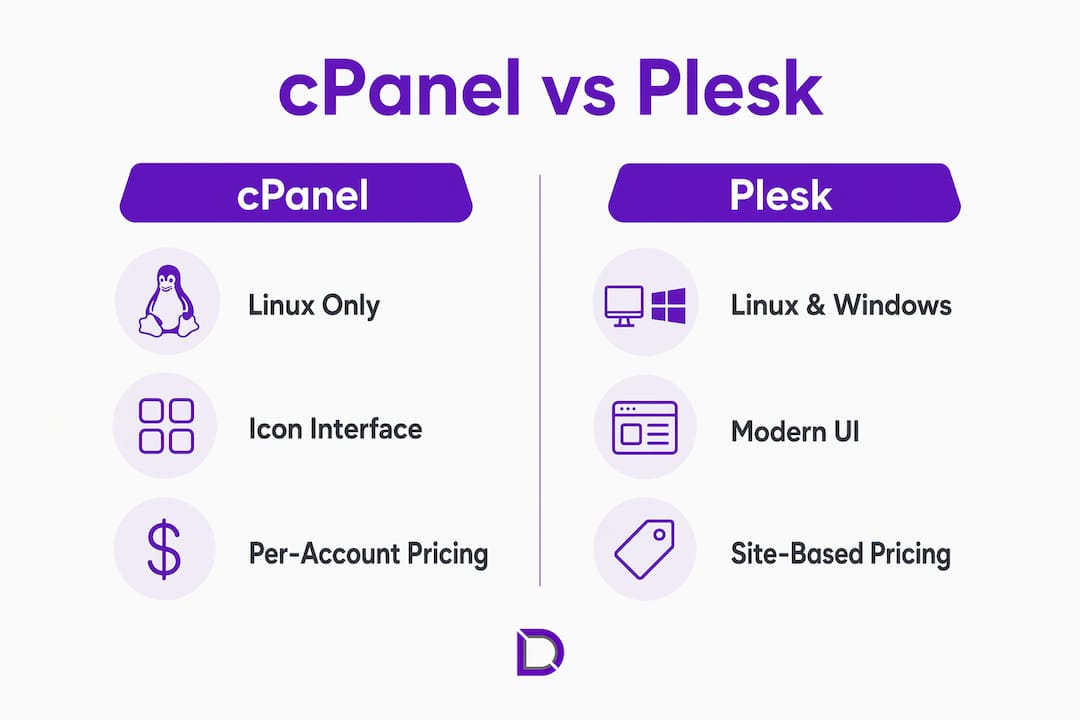
The most fundamental difference in the cPanel vs Plesk comparison is operating system compatibility. cPanel supports only Linux distributions, specifically CentOS, AlmaLinux, and Rocky Linux. Plesk supports both Linux and Windows Server, making it the only mainstream control panel available for Windows hosting environments. If your infrastructure runs Windows, the decision is made for you before you evaluate anything else.
Beyond operating systems, the two platforms diverge sharply in interface philosophy. cPanel uses a traditional icon-based grid layout that experienced Linux administrators recognise immediately. Plesk presents a modern sidebar-driven interface that resembles a SaaS product more than a legacy server tool. Neither approach is objectively better, but they attract different users.

| Feature | cPanel | Plesk |
|---|---|---|
| Operating system | Linux only (AlmaLinux, Rocky Linux) | Linux and Windows Server |
| Interface style | Icon grid, traditional layout | Sidebar, modern SaaS-style |
| WordPress management | Softaculous (third-party add-on) | WordPress Toolkit (built-in) |
| Developer tools | Limited native support | Docker, Git, Node.js out of the box |
| Admin separation | cPanel for users, WHM for admins | Single interface with mode switching |
Developer tooling is where Plesk pulls ahead most clearly. Plesk’s pricing and capabilities attract small VPS users and developers who need Docker, Git, and Node.js support without installing separate packages. cPanel requires additional configuration or third-party extensions to achieve the same result. For a development team deploying containerised applications, that difference in setup time is real and measurable.
WordPress management is another area where the platforms diverge. Plesk includes a native WordPress Toolkit for staging, cloning, bulk updates, and security hardening. cPanel users typically depend on Softaculous for similar functionality. Softaculous works well, but it is a third-party installer rather than a deeply integrated management layer.
How do cPanel and Plesk compare on pricing?
Pricing is where the cPanel vs Plesk comparison gets most consequential for hosting providers. cPanel switched to per-account tiered pricing in 2019, which raised costs significantly for high-density shared hosts. A provider running 500 cPanel accounts pays considerably more than one running 50, and the cost scales in a way that compresses margins for budget shared hosting operations.
Plesk uses a simpler website-count-based pricing model that delivers better cost predictability, particularly at lower account volumes. For a small VPS operator or a developer managing a handful of client sites, Plesk’s pricing structure is often more attractive. The table below illustrates the general cost positioning:
| Scenario | cPanel cost profile | Plesk cost profile |
|---|---|---|
| Small VPS (1-10 sites) | Higher relative cost per account | Lower, more predictable pricing |
| Mid-tier reseller (50-200 accounts) | Moderate, tiered by account count | Competitive, scales by domain count |
| Large shared host (500+ accounts) | Significant cost at scale | Can be more economical at volume |
| Windows hosting | Not applicable | Only viable option |
Pro Tip: If you are evaluating hosting platforms for a reseller business, calculate your projected account count at 12 months and 24 months, then model both cPanel and Plesk licensing costs against those numbers before signing any hosting contract.
cPanel’s major pricing update led many providers to reconsider Plesk or alternative panels for cost management at scale. This shift is worth noting if you are building a hosting business rather than managing a single server. The economics of your control panel choice compound over time.
What usability differences do administrators encounter?
The day-to-day experience of managing servers differs noticeably between the two platforms. cPanel’s interface is dense and icon-heavy, which suits administrators who have used it for years and know where everything lives. cPanel’s widespread use means most tutorials, documentation, and community support online are cPanel-focused, which lowers support friction when clients need help.
Plesk takes a different approach. Plesk’s modern SaaS-like UI reduces onboarding time for new administrators and appeals to developers familiar with DevOps tools. If you are hiring junior administrators or onboarding clients who will manage their own hosting, Plesk’s interface requires less training time.
Multi-tenancy management also works differently between the two. Plesk offers a single unified interface that switches between Power User and Service Provider modes. cPanel separates the user-facing panel from WHM, the Web Host Manager used by server administrators. WHM is powerful, but it adds a layer of complexity that new administrators sometimes find confusing.
Key usability considerations for each platform:
- cPanel suits teams with existing Linux administration experience, large client bases already familiar with the interface, and reseller setups using WHMCS for billing integration
- Plesk suits teams onboarding new staff, developers who want Git and Docker access from the control panel itself, and agencies managing multiple WordPress sites through the built-in WP Toolkit
Pro Tip: Before migrating an existing hosting environment from one panel to the other, audit which third-party integrations your team relies on daily. Tools like JetBackup and WHMCS have cPanel-specific configurations that require reconfiguration under Plesk.
For WordPress-focused hosting agencies, Plesk’s WP Toolkit offers staging, cloning, security hardening, and bulk update capabilities out of the box. The equivalent in cPanel is a paid add-on at lower tiers. Agencies managing 20 or more WordPress sites will notice the difference in management overhead within the first week.
Which hosting environment suits cPanel or Plesk in 2026?
Choosing between the two platforms is straightforward once you map your infrastructure and team profile against each platform’s strengths. Here is a practical framework for making that decision:
- You run Windows servers. Choose Plesk. cPanel does not support Windows, so this is a non-negotiable constraint.
- You operate a large Linux shared hosting environment with hundreds of accounts. cPanel’s mature ecosystem, including third-party plugins like Softaculous, JetBackup, and WHMCS, makes it the standard choice for high-volume reseller hosting.
- You manage a small VPS or a developer-focused server. Plesk’s pricing and native developer tools make it the more cost-effective and capable option.
- Your team is new to server administration. Plesk’s interface reduces the learning curve and speeds up onboarding.
- Your clients are non-technical and need self-service hosting management. cPanel’s ubiquity means more tutorials, more community answers, and more familiarity for end users who have used shared hosting before.
- You run a WordPress agency. Plesk’s built-in WP Toolkit reduces the need for third-party staging and backup tools, cutting both cost and maintenance overhead.
Migration between the two platforms is possible but not trivial. Both cPanel and Plesk offer migration tools, and third-party services exist to assist with the transition. The main friction points are email configuration, database permissions, and any custom server-level scripts tied to the original panel’s file structure. Plan for a staged migration with a test environment before moving production sites. Understanding the full scope of hosting control panel functions before you migrate will save you significant troubleshooting time.
Key takeaways
Choosing between cPanel and Plesk requires matching the platform’s OS support, pricing model, and toolset to your specific hosting environment and team capabilities.
| Point | Details |
|---|---|
| OS compatibility is decisive | Plesk supports Windows Server; cPanel does not. Windows hosting has only one viable option. |
| Pricing favours Plesk at small scale | cPanel’s per-account pricing increases costs at high account volumes; Plesk’s domain-count model is more predictable for smaller setups. |
| Developer tools favour Plesk | Docker, Git, and Node.js are native in Plesk; cPanel requires additional configuration or extensions. |
| Ecosystem depth favours cPanel | Softaculous, JetBackup, and WHMCS integrations make cPanel the standard for large reseller environments. |
| WordPress agencies benefit from Plesk | The built-in WP Toolkit reduces third-party dependency and management overhead for multi-site WordPress hosting. |
Why I think most people overthink this decision
After years of working with hosting environments across both platforms, the honest answer is that most administrators overthink the cPanel vs Plesk decision. The platforms are more similar than their marketing suggests. Both handle email, DNS, databases, and file management competently. The real differentiators are narrower than the comparison articles imply.
What actually matters in practice is your team’s existing knowledge base and your client expectations. If your team has spent five years in cPanel and your clients know how to navigate it, switching to Plesk for a marginal pricing benefit will cost you more in retraining and support tickets than you save on licensing. The reverse is equally true.
The one scenario where I think the choice is genuinely consequential is Windows hosting. There is no debate there. And for agencies building WordPress-heavy portfolios, Plesk’s WP Toolkit is a meaningful operational advantage that compounds as your site count grows. The managed hosting model increasingly favours platforms that reduce manual intervention, and Plesk’s integrated tooling aligns with that direction.
What I would caution against is choosing a control panel based on a feature list comparison alone. Spend a day in each interface before committing. The experience of actually managing a server through a panel tells you more than any specification table.
— James
Get the right hosting foundation with Com
The control panel you choose is only as good as the hosting infrastructure beneath it. Com provides Australian-based web hosting plans built for both cPanel and Plesk environments, backed by personalised local support that understands the real-world needs of website administrators and developers. Whether you are setting up a reseller environment, managing client sites, or launching your first VPS, Com’s team can help you match the right platform to your requirements. Explore Com’s hosting options and domain management services to build a hosting setup that works from day one.
FAQ
What is the main difference between cPanel and Plesk?
cPanel supports only Linux operating systems and uses a traditional icon-based interface, while Plesk supports both Linux and Windows Server and offers a modern sidebar-driven interface with native developer tools.
Is Plesk better than cPanel for WordPress hosting?
Plesk includes a built-in WordPress Toolkit with staging, cloning, and bulk update features, whereas cPanel relies on third-party tools like Softaculous. For agencies managing multiple WordPress sites, Plesk reduces management overhead.
Why did cPanel become more expensive?
cPanel switched to per-account tiered pricing in 2019, which raised costs for hosting providers running high numbers of accounts. This change led many providers to evaluate Plesk as a more cost-predictable alternative.
Can I use cPanel on a Windows server?
No. cPanel only supports Linux distributions including AlmaLinux and Rocky Linux. Plesk is the only mainstream control panel that supports Windows Server environments.
Which control panel is easier to learn?
Plesk’s modern interface reduces onboarding time for new administrators, while cPanel’s dense layout suits experienced Linux users. The abundance of cPanel tutorials online does lower the support burden for end users already familiar with shared hosting.
Leave a Reply