




Signing up for a $3-a-month hosting plan feels like a win. You’re keeping costs low, your site goes live, and everything looks fine at first. But why cheap hosting causes problems often becomes clear only after the damage is done: a site that loads slowly, drops off Google, or goes down during your busiest sales period. For small business owners, these aren’t just technical inconveniences. They directly affect revenue, reputation, and growth. This article unpacks the real risks so you can make a smarter decision before it costs you more than the money you saved.
Table of Contents
- Key takeaways
- Why cheap hosting causes problems with site speed
- SEO and conversion risks from poor hosting
- The hidden costs of cheap hosting plans
- How to evaluate hosting options wisely
- Migrating away from cheap hosting
- My honest take on cheap hosting
- Get reliable hosting with Com
- FAQ
Key takeaways
| Point | Details |
|---|---|
| Performance suffers on cheap plans | Overcrowded shared servers slow your site and hurt user experience from day one. |
| SEO rankings take a direct hit | Downtime and slow load speeds reduce Googlebot crawling and push your site down in search results. |
| Hidden costs add up fast | Cheap hosting fees rarely include backups, security, or support, inflating your real monthly spend. |
| Time lost managing issues is costly | Founders can spend 9 to 12 hours monthly troubleshooting cheap hosting problems. |
| Upgrading is easier than you think | A well-planned migration to managed hosting minimises disruption and quickly restores performance. |
Why cheap hosting causes problems with site speed
Your hosting provider is the foundation everything else sits on. When that foundation is shaky, no amount of good design or great content will save you.
The most common cheap hosting setup is shared hosting, where hundreds or even thousands of websites share the same physical server. When another site on that server gets a traffic spike, your site slows down too. You have no control over it. This is called the “noisy neighbour” effect, and it’s one of the most frustrating cheap hosting issues small business owners encounter.

The technical measure most affected is Time to First Byte (TTFB), which is how long your server takes to respond to a browser request. TTFB above 800ms makes it nearly impossible to achieve a Largest Contentful Paint (LCP) score under two seconds. LCP is one of Google’s Core Web Vitals, and failing it means your site is slower than what Google considers acceptable for users.
Here’s what that means practically:
- Slow server response causes your entire page to load late, regardless of how well your images are optimised.
- Inconsistent speeds frustrate visitors who experience fast loads one day and sluggish ones the next.
- Frequent downtime on budget plans means your site is simply unavailable when visitors arrive.
- Poor Core Web Vitals scores (LCP, INP, CLS) signal to Google that your site delivers a poor user experience.
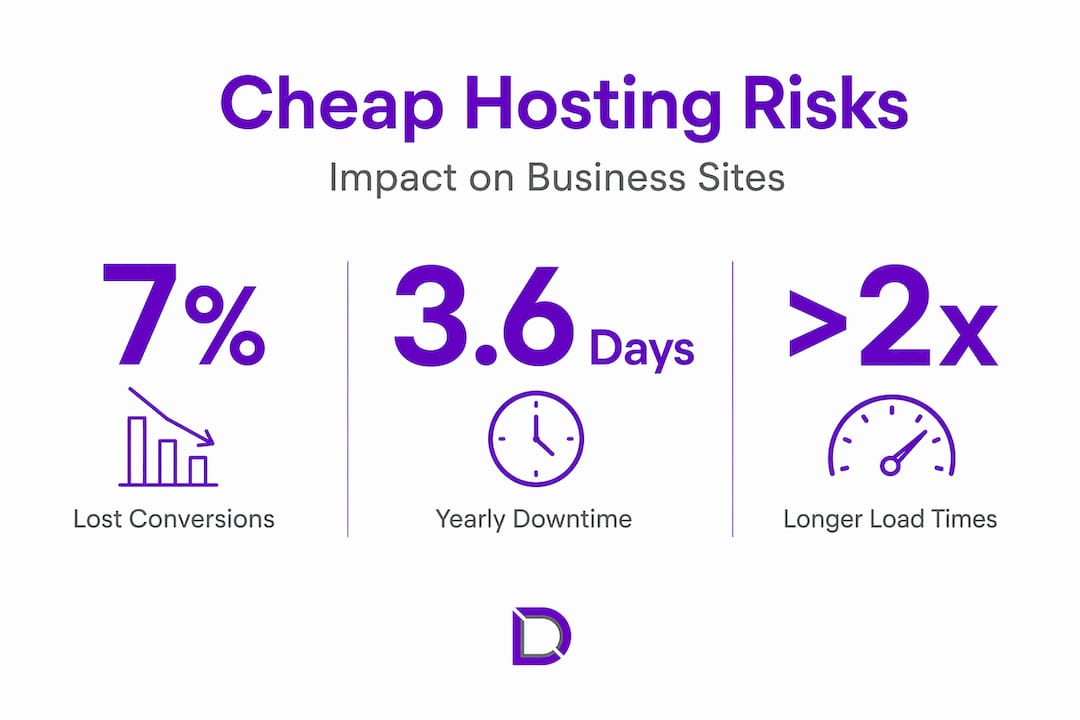
Every one-second delay in page load correlates with a 7% drop in conversions. For a small business generating $5,000 a month online, that single second could be costing you $350 every month.
Pro Tip: Test your current site’s TTFB using Google’s PageSpeed Insights or GTmetrix. If your TTFB is consistently above 600ms, your hosting is likely the bottleneck, not your website code.
SEO and conversion risks from poor hosting
Google does not rank websites in isolation. It ranks the full experience a site delivers, and hosting quality sits at the core of that experience.
Hosting does not give you an SEO boost, but poor hosting actively drags your rankings down by creating technical bottlenecks that prevent your content from performing. Think of good hosting as removing obstacles rather than adding advantages.
Here is how the problems with low-cost hosting translate directly into lost search visibility:
- Downtime creates crawl errors. When Googlebot visits your site and finds it unavailable, it records a server error. Frequent downtime reduces crawl budget and can cause Google to deindex pages entirely.
- Slow INP scores drop your ranking. Google’s March 2026 core update formalised Interaction to Next Paint (INP) as a ranking signal. INP scores above 500ms can cause average position drops of two to four places in search results.
- Security breaches trigger blacklisting. Cheap shared hosting environments are more vulnerable to malware. Google flags hacked sites with warnings or removes them from search results entirely, wiping out visibility overnight.
- High bounce rates signal poor quality. When visitors land on a slow site and leave immediately, that behaviour tells Google your page did not satisfy the search intent, which compounds ranking drops.
“Quality hosting eliminates slow TTFB and downtime that negatively affect ranking. It removes the technical ceiling that prevents good content from reaching its potential audience.”
The compounding effect is the real danger here. A site that is slow, occasionally down, and running on insecure infrastructure accumulates ranking penalties over months. By the time you notice the traffic decline, the damage is already deep.
A 99.0% uptime guarantee, which sounds reassuring, actually means 3.6 days of downtime per year. At 99.9% uptime, that drops to 8.7 hours. The difference matters enormously for both SEO and customer trust.
The hidden costs of cheap hosting plans
The advertised price is rarely the real price. This is one of the most overlooked dangers of budget web hosting, and it catches small business owners off guard repeatedly.
| What cheap hosts advertise | What you actually pay for |
|---|---|
| $3 to $5 per month hosting | Backups charged as an add-on |
| Free SSL certificate | Security scanning sold separately |
| Unlimited storage | Throttled performance above a threshold |
| 24/7 support | Long wait times or offshore ticketing only |
| Free domain for year one | Renewal at full price from year two |
Cheap hosts often charge extra for backups, security tools, and software updates that managed hosting providers include as standard. Once you add those up, the price difference between cheap and quality hosting shrinks considerably.
The less visible cost is your time. Founders managing cheap hosting spend an average of 9 to 12 hours per month on maintenance tasks: troubleshooting errors, applying updates, dealing with support tickets, and recovering from outages. At a conservative valuation of your time, that translates to $900 to $1,200 in lost opportunity cost every single month.
Pro Tip: Before comparing hosting prices, write down every feature you currently manage yourself: backups, SSL renewals, malware scanning, plugin updates. Then check whether your prospective host includes these or charges extra. That’s your true comparison.
That operational drag compounds over time. Every hour spent fixing a server error is an hour not spent on sales, product development, or customer relationships. This is why the risks of cheap hosting are ultimately a strategic problem, not just a technical one.
How to evaluate hosting options wisely
Not all paid hosting is good hosting, and not all cheap hosting is equally bad. The goal is to know what to look for so you can make a confident decision rather than a hopeful one.
Key features worth prioritising
When assessing any hosting provider, these are the non-negotiables for a small business website:
- Uptime guarantee of 99.9% or higher, with a published SLA and compensation policy
- Server response times (TTFB) under 200ms for Australian visitors, which requires locally hosted infrastructure
- Automatic daily backups included in the base plan, not sold as an add-on
- Free SSL certificate with automatic renewal
- Managed security including malware scanning and firewall protection
- Local support with real response times, not just a ticketing system
Understanding your hosting options
Shared hosting is the cheapest option and suits sites with very low traffic that are not business-critical. For most small businesses, it creates more risk than it saves money.
VPS (Virtual Private Server) hosting gives you dedicated resources on a shared physical machine. It is more stable than shared hosting and suits growing businesses with moderate traffic. You can read more about hosting types for small businesses to understand which tier matches your current needs.
Managed hosting is the most hands-off option. The provider handles updates, security, backups, and performance monitoring. You focus on running your business. The advantages of premium hosting become most obvious when you calculate the time and stress you stop spending on technical maintenance.
For Australian businesses, server location matters more than most people realise. Hosting your site locally reduces latency for Australian visitors and can meaningfully improve your Core Web Vitals scores. Local Australian hosting also means support teams operate in your time zone, which is worth more than it sounds when something goes wrong at 9am on a Monday.
Migrating away from cheap hosting
If you recognise your current setup in this article, the good news is that moving to better hosting is more straightforward than most business owners expect.
- Audit your current site. Document every plugin, theme, database, and email account before touching anything. This becomes your migration checklist.
- Choose your new host and set it up first. Build and test your site on the new server before changing any DNS settings. This means zero visible downtime for visitors.
- Back up everything. Even if your current host offers backups, download a full copy locally before you begin. Never rely on a cheap host’s backup system during a migration.
- Test thoroughly before going live. Check every page, form, and checkout flow on the staging environment. Fix issues before the switch, not after.
- Update your DNS and monitor closely. DNS changes propagate over 24 to 48 hours. Watch your analytics, uptime monitor, and Google Search Console during this window for any anomalies.
- Submit an updated sitemap to Google. Once your new site is live and stable, resubmit your sitemap via Search Console to prompt fresh crawling. Migration to managed hosting can restore SEO stability quickly when the transition is handled cleanly.
Working with a managed hosting provider means you often have expert support throughout this process rather than navigating it alone. For many small business owners, that support alone justifies the switch.
My honest take on cheap hosting
I’ve spoken with dozens of small business owners over the years who came to us after a bad experience with budget hosting. The story is almost always the same. They saved $20 or $30 a month, and then spent six months wondering why their Google rankings were sliding, why their site felt sluggish, or why they kept getting calls from customers saying the site was down.
What surprises me most is not the technical failure. It’s the emotional toll. Founders who chose cheap hosting to save money end up spending mental energy on problems they never anticipated. That anxiety about whether the site is up, whether it’s been hacked, whether the backup worked — that’s not what you started a business to worry about.
I genuinely believe hosting is one of those decisions where the cheapest option is rarely the most economical one. When you factor in the time, the stress, the SEO impact, and the lost conversions, quality hosting pays for itself. I’ve seen businesses recover significant organic traffic within two to three months of migrating to a properly managed environment.
My advice is simple. Treat your hosting the same way you treat your business phone line or your accounting software. It’s infrastructure. You need it to work reliably, quietly, and without requiring your constant attention. When it does that, you barely notice it. When it doesn’t, it’s all you think about.
— James
Get reliable hosting with Com
If this article has made you question your current setup, that’s a good instinct to follow. Com offers web hosting plans built specifically for Australian small businesses, with local support, automatic backups, and performance infrastructure that won’t hold your site back.
Combining your hosting with domain management through a single provider simplifies everything: one support contact, one renewal cycle, and no gaps between services. There are no surprise add-on fees for the features that actually matter. If you’re not sure where your website stands right now, download the free business checklist to assess your online readiness and identify what needs attention first.
FAQ
Why does cheap hosting slow down my website?
Cheap hosting typically places hundreds of websites on a single shared server. When resources are stretched thin, your site’s server response time increases, directly slowing page loads and hurting Core Web Vitals scores.
Can cheap hosting hurt my Google rankings?
Yes. Downtime causes crawl errors that reduce Googlebot’s indexing frequency, and slow load speeds negatively affect Core Web Vitals signals that Google uses as ranking factors in 2026.
Is cheap hosting ever acceptable for a small business?
For a low-traffic personal or portfolio site, shared hosting may be sufficient. For any business-critical website where downtime, speed, or security matters, the risks of inexpensive hosting outweigh the savings.
How much downtime does a 99% uptime guarantee actually mean?
A 99.0% uptime guarantee equals approximately 3.6 days of downtime per year. A 99.9% guarantee reduces that to around 8.7 hours, which is a significant difference for both SEO and customer experience.
How do I know if my hosting is causing my SEO problems?
Check your Google Search Console for crawl errors and coverage issues, then test your TTFB using PageSpeed Insights. If your TTFB consistently exceeds 600ms and you’re on a shared plan, your hosting is almost certainly contributing to ranking drag. You can also choose managed IT services to get a professional assessment of your full technical setup.
Leave a Reply