




Starting an online presence without understanding your domain name is like printing business cards without knowing your business name. A domain name explained properly goes far beyond “the thing you type into a browser.” It is the address, the identity, and in many ways the first impression your business makes online. Whether you are setting up your first website or trying to make sense of DNS settings your web developer mentioned, this guide covers everything you need to know, without the jargon.
Table of Contents
- Key takeaways
- Domain name explained: what it is and how it works
- Breaking down domain name structure
- How to register a domain name
- Managing your domain over time
- My take on why domains are a strategic asset
- Get your domain set up the right way with Com
- FAQ
Key takeaways
| Point | Details |
|---|---|
| Domains replace numeric addresses | A domain name translates complex IP addresses into a memorable, human-readable web address. |
| DNS does the translation work | The Domain Name System connects your domain to the right server every time someone types your address. |
| Registration requires a licensed registrar | You register through an accredited registrar, not directly with the internet authority itself. |
| Short and simple names win | The best domain names are brief, easy to spell, and free of hyphens or unusual characters. |
| Ongoing management matters | Renewing on time and keeping your contact details current protects you from losing your domain. |
Domain name explained: what it is and how it works
Think of the internet as a vast city where every building has a street address made up of numbers. Those numbers are called IP addresses, and they look something like 192.168.1.1. Computers love them. People do not. That is exactly why domain names were created.
A domain name is a human-readable web address that replaces those numeric IP addresses. When you type “mybusiness.com.au” into a browser, a system called the Domain Name System (DNS) translates that name into the correct IP address, locating the server where your website lives. This process has been fundamental to how the internet works since 1985.

It helps to understand the difference between a domain name, a URL, and a hostname. Your domain name is “mybusiness.com.au.” Your URL is the full address, including the protocol and any page path, such as “https://mybusiness.com.au/about.” Your hostname typically refers to the specific server or subdomain, like “www.mybusiness.com.au.” These terms are related but not interchangeable.
The DNS hierarchy is designed as a distributed database. No single server holds all domain records. Instead, root servers point to top-level domain (TLD) servers, which then point to authoritative name servers for each domain. This design means the system is resilient. There is no single point of failure.
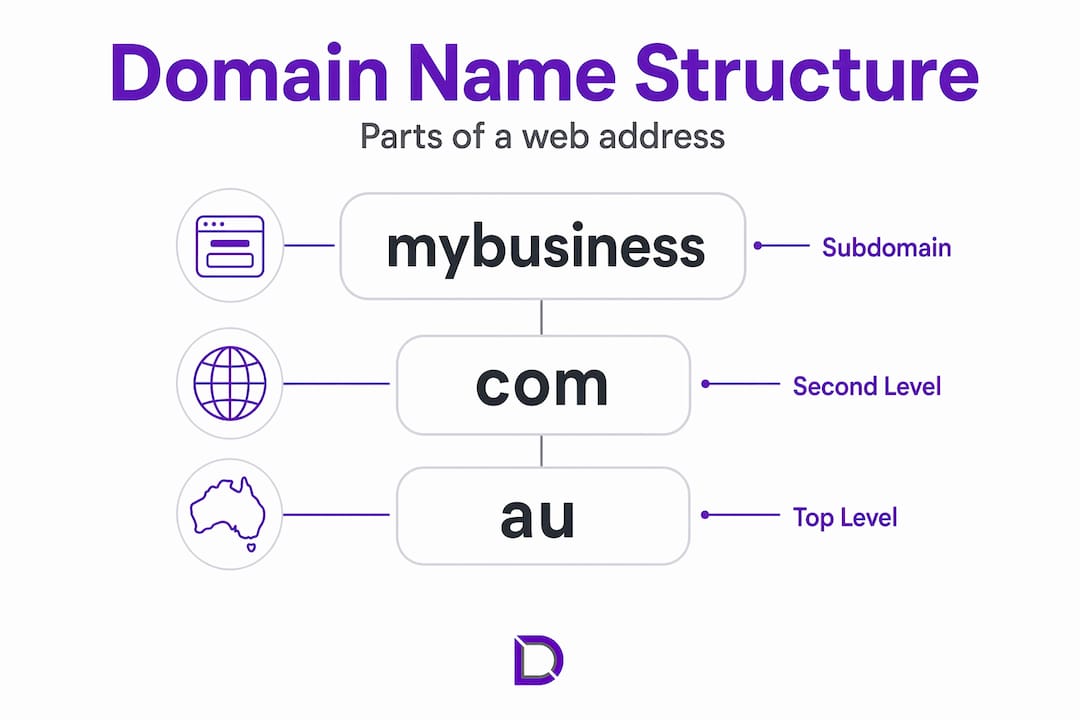
A domain name itself is made up of labels separated by dots. In “mybusiness.com.au,” the labels are “mybusiness,” “com,” and “au.” Reading from right to left, “au” is the country code TLD, “com” is the second-level domain indicating a commercial entity, and “mybusiness” is the name you have chosen. Each label plays a role in the structure.
Pro Tip: Never confuse your domain name with your website. Your domain is your address. Your website is what sits at that address. You can own a domain without having a website live on it yet.
Breaking down domain name structure
Once you understand how domain names work in general, it pays to understand the technical parts in more detail. This is where terms like FQDN and DNS records come into play, and where small mistakes can cause real problems.
A Fully Qualified Domain Name (FQDN) is the complete, precise version of a domain name that specifies its exact location in the DNS hierarchy. It includes the hostname, the domain, and ends with a trailing dot representing the DNS root. For example, “www.mybusiness.com.au.” with the final dot is an FQDN. Most everyday use hides that trailing dot, but omitting it in DNS records can cause misinterpretation and configuration errors.
DNS records are the instructions that tell the internet what to do with your domain. Here is a breakdown of the most common types:
| Record type | What it does |
|---|---|
| A record | Maps your domain to an IPv4 address (the main web server) |
| AAAA record | Maps your domain to an IPv6 address |
| CNAME record | Creates an alias pointing one domain name to another |
| MX record | Directs email to the right mail server |
| NS record | Specifies the authoritative name servers for your domain |
| SOA record | Holds administrative information about your domain zone |
These DNS record types each serve a different function, and getting them right matters. A missing or incorrect MX record means your business emails stop arriving. A misconfigured A record means your website goes offline.
One of the most common DNS mistakes is leaving out the trailing dot in FQDN entries. Explicit trailing dots in DNS records maintain clarity and prevent unintended domain name expansions. For MX records in particular, omitting that trailing dot causes DNS servers to append the current zone name to the mail server address, which breaks email delivery entirely. It is a small detail with large consequences.
Pro Tip: When setting up DNS records, always check whether your registrar’s control panel adds the trailing dot automatically. Some do, some do not, and assuming incorrectly can take your email offline without any obvious error message.
How to register a domain name
Domain name registration is the process of reserving a specific web address for your exclusive use, typically for one to two years at a time. ICANN-accredited registrars handle registrations and maintain the WHOIS database, which records who owns each domain.
The registration process itself is straightforward. You search for your preferred name through a registrar, confirm it is available, choose your extension, and pay the registration fee. What takes more thought is deciding which name to register.
Here is what good domain name selection looks like in practice:
- Keep it short. Aim for under 15 characters if possible. Shorter names are easier to remember, easier to type, and less likely to be misheard.
- Make it easy to spell. If you have to spell it out every time you say it, reconsider. Creative spellings lose customers who type the normal version instead.
- Avoid hyphens and numbers. Simple, hyphen-free names are less confusing when shared verbally and look cleaner in print.
- Match your brand. Your domain should reflect your business name or what you do. Consistency between your domain and your other marketing builds trust.
- Choose the right extension. For Australian businesses, a .com.au extension signals local credibility. A .com works well for global reach. Extensions like .org suit not-for-profit organisations.
Trademark considerations are worth taking seriously before you register. Choosing a name that is already trademarked in your industry can result in a legal dispute and forced transfer of the domain, regardless of who registered it first. Run a quick search with IP Australia before committing to any name.
Defensive registration is another strategy worth knowing. Once you settle on your primary domain, consider registering common misspellings and alternative extensions so competitors or bad actors cannot use them against you. A business registering “myshop.com.au” might also grab “myshop.com” and “myshop.net.au” to protect the brand.
Managing your domain over time
Registering a domain is the beginning, not the end. Many businesses lose domains they have built a reputation on simply because they forgot to renew, changed email addresses, or never set up proper security. Ongoing domain management prevents these entirely avoidable problems.
Here are the most important management practices to build into your routine:
- Set renewals to auto-renew. Most registrars offer automatic renewal. Turn it on. Failing to renew leaves your domain open for anyone to register, and recovery is expensive or impossible.
- Keep contact details current. Your registrar sends renewal notices and security alerts to the email address on your account. If that address is outdated, you miss critical communications.
- Enable a domain lock. Domain locking prevents unauthorised transfers away from your registrar. It takes seconds to enable and significantly reduces the risk of domain hijacking.
- Activate privacy protection. WHOIS records are publicly accessible by default, which means your name, phone number, and address are visible to anyone. Privacy protection replaces your details with registrar contact information.
- Review your domain portfolio annually. As your business grows, you may acquire multiple domains. An annual review helps you decide what to renew, what to let expire, and whether new extensions or brand variations are worth adding.
Managing multiple domains or navigating DNS settings is where professional support earns its value. For small businesses without dedicated IT staff, having a local provider handle the technical side means less risk and more confidence.
My take on why domains are a strategic asset
I have worked with enough small business owners to know that the domain name question usually comes up too late. Someone has already registered something awkward, or they have let their original domain expire and lost years of search engine credibility with it.
What I have seen again and again is that business owners treat domains as an afterthought, a technical box to tick when building a website. But your domain is the one piece of your online identity that everything else connects to. Your email, your website, your Google Business profile. All of it flows through that one name.
The businesses that get this right treat their domain the way they treat their trademark. They research it before committing, they protect it with defensive registrations, and they manage it with the same care they give to their bank account details. The businesses that get it wrong spend time and money trying to recover ground that was never lost in the first place.
My honest advice: before you spend a dollar on web design or advertising, get your domain right. A forgettable, hard-to-spell, or legally risky domain name will quietly undermine everything you build on top of it.
— James
Get your domain set up the right way with Com
Com is an Australian-based provider offering domain registration and management with personalised local support. Whether you are registering your first domain or taking over management of an existing one, the team at Com understands the specific needs of Australian small businesses. From choosing the right .com.au extension to configuring DNS records correctly from day one, Com handles the details so you can focus on running your business. Pair your domain with reliable web hosting solutions or a professionally built website design to create a complete online presence that works from the ground up.
FAQ
What is a domain name in simple terms?
A domain name is the human-readable address people type to find your website, such as “.” It replaces a numeric IP address that computers use to locate servers on the internet.
How does DNS work with a domain name?
The Domain Name System (DNS) acts like a phone book for the internet. When someone types your domain, DNS translates it into the correct IP address and connects the browser to your website’s server.
What is the difference between a domain name and a URL?
Your domain name is “.” Your URL is the full address including the protocol and page path, such as “” The domain is one component of the URL.
How do I register a domain name in Australia?
You register through an accredited registrar, search for your preferred name, select an available extension such as .com.au, and pay the registration fee. Renewal is typically required every one to two years.
What happens if I forget to renew my domain?
If you miss the renewal deadline, your domain enters a grace period. After that, it becomes available for anyone to register. You could permanently lose the domain and all the brand recognition and search ranking built on it.
Leave a Reply